AI News
  • Apk apps
  • Android Tips/Tricks
  • Phone Reviews
  • How To
  • Phone Reviews
No Result
View All Result
AI News
  • Apk apps
  • Android Tips/Tricks
  • Phone Reviews
  • How To
  • Phone Reviews
No Result
View All Result
AI News
No Result
View All Result
10GB Free Data Using SIMO App: Blazing just fine

10GB Free Data Using SIMO App: Blazing just fine

Droidvilla Admin by Droidvilla Admin
July 10, 2021
in 9Mobile, Airtel, Android Tips/Tricks, Apk apps, Glo, How To
4
944
SHARES
3k
VIEWS
Share on whatsappShare on FacebookShare on TwitterShare on Telegram

How To Browse The Internet Without SIm Card and enjoy 10GB Free Data Using SIMO App

Contents hide
I. How To Browse The Internet Without SIm Card and enjoy 10GB Free Data Using SIMO App
II. Note:
II.I. About SIMO App:
III. Features/Benefits Of SIMO
IV. How to set up
V. Note:
VI. Payment Methods
VII. Awesome service:
10GB Free Data Using SIMO App: Blazing just fine
Simo
Introducing to you SIMO app which allows you to surf the internet without sim card and bomb is that, you get free 10gb worth of simo data for free. 


This app actually lets you access the internet on your phones without a SIM card or connecting to any Wi-Fi. With the help of yet another awesome connectivity app known as SIMO has made it possible. With this app on your phone, you can for sure surf your favourite sites for free without a sim card inserted. Simo app data free 10gb is for all devices which is eligible for the virtual data. So if you device is not compatible for simo, then you will not be able to get the free simo app data of 10gb.

Note:

This app is phone selective, meaning that it works on Supported devices only. We got you covered by letting you know few devices that are compatible for this SIMO free net app. 


We have Tecno Camon 12, Camon 12 Pro and the Camon 12 Air. 

 Reason being that these phones are built with a Virtual Sim chip technology that allows you to enjoy high internet speed even without a Sim card.

Obviously this is a welcome development from TECNO! 

About SIMO App:

SIMO is an app that works as a virtual data SIM that connects you to the internet without a WiFi or SIM card in your phone.


We are proud to let you know that 130 countries are supported and you can browse the internet at a high 4G LTE speed no matter your location and country with No SIM, No Wi-Fi with the use of this crazy SIMO app.
For now just few supported devices are available at the moment, we are hoping for more devices as the days goes to enjoy the free simo app data 10gb.

Features/Benefits Of SIMO

  • While using SIMO, no need for SIM card. Even though you got a sim card inserted you need not to turn on your data connection. It simply works with or without a sim card inserted.
    10GB Free Data Using SIMO App: Blazing just fine
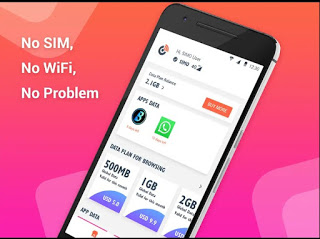
    No sim, No wifi no problem 


This is crazy but technology made it 100% possible! 

  • With SIMO, you will get to use different networks. You won’t be stuck or tied to a particular network provider. You may see Airtel NG connected, but the next time you connect, you might see Glo, MTN or 9mobile network. 

You pay as you go when using SIMO. No contracts, no

10GB Free Data Using SIMO App: Blazing just fine
Simo


paperwork, no limits.

To spice this up, you will get free simo app data of 10GB trial data as a new user for the first month of using the SIMO App.
I know people having the device eligible for this is actually thinking of a way to get over this. 
  • SIMO also offers Roaming-services for free. You pay a low rate for data no matter where you go. No surprise roaming charges or expensive international phone plans.

How to set up

  1. Enable your phone Wi-Fi connection
  2. Launch the SIMO app on your supported phone like the Tecno Camon 12 series.
  3. Sign up using your email address, social profile or phone number

After successful login, turn off your wifi and click the ‘Connect’ button on SIMO homepage to get your phone connected with a local network.

Note: 

After exhausting your free simo app trial data 10GB, you’re required to pay for the data plans on the SIMO app to continue enjoying the services. It’s less expensive and there are various Plans: Use all data you pay for, with more affordable price, no daily limits attached. (Recommended) 

Payment Methods 


SIMO app have multiple payment methods which are:
  • Credit card
  • PayPal
  • T-cash
  • Go-pay
  • Paytm (coming soon)

Awesome service:

10GB Free Data Using SIMO App: Blazing just fine
24×7
  • Get Support 24/7
  • Contact customer service within the app.

Enjoy SIMO app on your inbuilt virtual SIM chip technology smartphone with cheaper and faster internet services. Enjoy simo app data for as long as you wish.


Don’t forget to subscribe to our newsletter for more exclusive update. 
Tags: data plan on simoFree browsing cheats and updatesSimosimo app dataTech updatesTips
SendShare378Tweet236Share
Droidvilla Admin

Droidvilla Admin

I am Nnoka Godswill also known as Favtechblogger. Lover of Android/Technology, a passionate tech content creator with over 5 years + of blogging experience, an SEO god, a Marketer, and a graduate of Electronics and Computer Engineering from the University of Port Harcourt . Email the author at favtechblogger@gmail.com.

Related Stories

Download/Save Disabled TikTok Videos to Gallery

How to Download/Save Disabled TikTok Videos to Gallery

by Droidvilla Admin
April 27, 2024
0

- How to Download/Save Disabled TikTok Videos to Gallery - Funny TikTokers to follow TikTok is the go-to social media app for content creators and enthusiasts alike, with...

know your GOtv login details

How to Know your GOTV login details (Surname and Phone Number) if forgotten

by Droidvilla Admin
January 22, 2024
1

- How to know your GOtv login details (Surname and Phone Number) if forgotten Hi there, did you forget your login details associated with GOtv and you're looking...

resubmit Pi KYC in 2024

How to resubmit Pi KYC in 2024 and get approval in minutes

by Droidvilla Admin
January 18, 2024
0

Pi has recently given all pioneers the opportunity to resubmit Pi KYC in 2024 after a very long wait. For all those who waited for this long to...

DSTV Now App Not Showing Live Channels

DSTV Now Error: 1 Fix to DSTV Now App Not Showing Live Channels

by Droidvilla Admin
January 14, 2024
0

@dstvcareFinally, here is a solution to fix the dstv now error app not showing live channels when a subscription is active. The dstv now error suddenly do not show/display...

Next Post
New promo alert: Glo to empower 1000 entrepreneurs

New promo alert: Glo to empower 1000 entrepreneurs

Comments 4

  1. Anonymous says:
    6 years ago

    Very nice post.

    Reply
  2. Obomedaire Ese says:
    6 years ago

    Will download it later to see if it is compatible with my infinix device.

    Reply
  3. Sa'eed says:
    6 years ago

    I just bought new camon 12 last week and am currently flexing my free 10g.

    Reply
  4. Unknown says:
    6 years ago

    They gave me 1gb but if I want to buy new one e no go gree

    Reply

Leave a Reply Cancel reply

Your email address will not be published. Required fields are marked *

  • About
  • Advertise
  • Privacy & Policy
  • Contact Us
  • Disclaimer

© 2026 JNews - Premium WordPress news & magazine theme by Jegtheme.

Welcome Back!

Login to your account below

Forgotten Password?

Retrieve your password

Please enter your username or email address to reset your password.

Log In
No Result
View All Result
  • Apk apps
  • Android Tips/Tricks
  • Phone Reviews
  • How To
  • Phone Reviews

© 2026 JNews - Premium WordPress news & magazine theme by Jegtheme.