AI News
  • Apk apps
  • Android Tips/Tricks
  • Phone Reviews
  • How To
  • Phone Reviews
No Result
View All Result
AI News
  • Apk apps
  • Android Tips/Tricks
  • Phone Reviews
  • How To
  • Phone Reviews
No Result
View All Result
AI News
No Result
View All Result
2 Easy steps on how to transfer whatsapp stickers

2 Easy steps on how to transfer whatsapp stickers

Droidvilla Admin by Droidvilla Admin
October 21, 2021
in Android Tips/Tricks, How To
2
1.5k
SHARES
4.8k
VIEWS
Share on whatsappShare on FacebookShare on TwitterShare on Telegram
– How to transfer whatsapp stickers
– Get your favorite stickers all exported in 2 easy steps

– You can either export all backed up whatsapp stickers to your external memory card or desktop and get them imported back to a new whatsapp if you later switch

Contents hide
I. 2 Easy steps on how to transfer whatsapp stickers
II. Transfer whatsapp stickers to external Card (Memory Card)
III. Here are steps to transfer all whatsapp stickers to an external storage (Memory Card)
IV. Transfer whatsapp stickers to your desktop (Laptop, computer) etc.
V. Here are steps to transfer all whatsapp stickers to a computer
VI. How to transfer/restore/import back the exported whatsapp stickers to a new WhatsApp

Hello guys, here is another interesting article we found helpful and we thought it wise to share with everyone as we all one way or the other wish to have back our old whatsapp stickers on a new WhatsApp account or are you wanting to switch over from Gbwhatsapp to normal whatsapp and you don’t want to miss those funny and amazing whatsapp stickers you have on the gbwhatsapp.

This post will guide you through on a 2 easy steps to backup all whatsapp stickers and export them either to your memory card or system and get them back imported into the new whatsapp without having to go about begging contacts to share you whatsapp stickers as most times results to insults and contacts requesting for data.

Top Suggestion: How to Secure Your WhatsApp Account From Hackers
So just if you have been embarrassed before now just because of common whatsapp stickers you messaged a friend or contact to send to you, then I am pretty sure we made this post just for you. Thanks to us (Lol).

2 Easy steps on how to transfer whatsapp stickers

There are two easy steps to export all whatsapp stickers in one folder and they are:
  1. Export whatsapp stickers to external Card (Memory Card)
  2. Export whatsapp stickers to your desktop (Laptop, computer) etc.
Without wasting much of the time, lets get started with the first step on how to backup whatsapp stickers.

Transfer whatsapp stickers to external Card (Memory Card)

This step is actually the easiest and common one, but we recommend the second for some reasons which we shall discuss as we proceed.

Since you want to get all your whatsapp stickers exported for future ease of importation to a new WhatsApp in the future, whatsapp already created a folder which all you have to do is simply mark the folder and move or copy  to a preferred storage destination.

Suggested Article: Whatsapp Status Tips/Tricks and Hidden Features In 2020

Here are steps to transfer all whatsapp stickers to an external storage (Memory Card)

Kindly follow steps below to achieve the purpose of this first process.
  1. Open your phone file manager or any preferred installed file manager on your device (File explorer, es explorer) etc.
  2. Now locate your whatsapp root folder ( either on your internal storage or memory card), as for the image below mine was on the external card (memory card) because I set my memory card as the primary storage for my device.
  3. Now open the whatsapp folder and you should see lots of folders
  4. Search and open media folder
  5. Now locate “Whatsapp Stickers” folder and hold on it

    how to transfer whatsapp stickers
    how to transfer whatsapp stickers

  6. Once the whatsapp sticker folder is marked, you should see a copy, move, delete and edit options below or you can tap on the three dotted icon at the top right side of the screen to see options.
  7. Now tap on copy (Recommended)
  8. Finally select a new storage destination you want the whatsapp stickers exported to and either create a new folder and name jt (whatsapp stickers Backup, or your desired folder name). Note that, external storage (memory Card is recommended, so you don’t mistakenly format your device which will lead to internal storage been wiped.
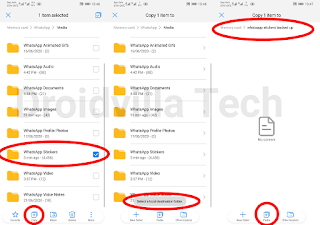
    how to transfer whatsapp stickers
    transfer whatsapp stickers to a new phone

  9. Now hit the paste button and wait patiently for the exportation to be successful.
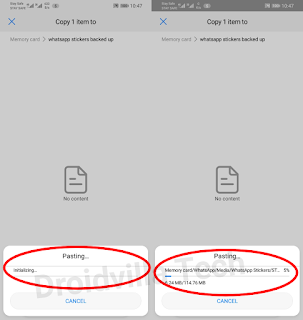
    transfer whatsapp stickers
    transfer whatsapp stickers

Finally you have successfully exported all whatsapp stickers to your external storage, and can now import them back into a new WhatsApp to recover back all your whatsapp stickers at once.

Finally, here is the second method to export whatsapp stickers using your computer.

Transfer whatsapp stickers to your desktop (Laptop, computer) etc.

Oh yes, this is quite easy and the best method i recommend because it is very safe when exported to your computer as you are sure of it not tampered with, but that applies if your system is virus free. (lol)

Here are steps to transfer all whatsapp stickers to a computer

Follow steps below and get the whatsapp stickers exported swiftly…
Before getting to proceed, do ensure you have a stable USB cable that allows File transfer and not meant for charging alone and a laptop or computer with at least 1GB of free storage.
  1. Get a laptop, USB cable (Data Storage), and your android device
  2. Now connect your Android device to your laptop or computer and do enable USB storage or file transfer when prompted on your android screen, to enable your files visible on the computer or laptop.
  3. Now open your device storage on your system and go to whatsapp folder
  4. Locate and open media folder
  5. Now find whatsapp stickers and simply tap and right click your mouse 🖱
  6. Select copy option and go to your computer or laptop desktop and press Ctrl V (Paste shortcut key)

    transfer whatsapp stickers on computer
    transfer whatsapp stickers

  7. Finally wait patiently as the whatsapp sticker folder gets copied to your desktop.
Congratulations you have successfully exported your whatsapp stickers to your computer or laptop.

How to transfer/restore/import back the exported whatsapp stickers to a new WhatsApp

Asking how can you restore WhatsApp stickers to WhatsApp?
 
All you have to do is simply go to your memory card storage where you recently exported the whatsapp stickers and copy the folder and paste it on the other whatsapp – – – Media-—- folder…

Ensure to delete the already whatsapp stickers folder on the new whatsapp folder to avoid conflict.

If you want to import from your laptop or computer, simply connect your android device to your computer or laptop and copy the folder and paste it on the other whatsapp  – – – Media-—- folder destination ..

Ensure to have deleted or delete the already made whatsapp stickers folder on the new whatsapp media folder.

Was this informative and helpful?
Do leave a comment behind and share post to various social platforms below.

Stay updated always via Droidvilla Tech whatsapp status updates…
Tap here to send us a whatsapp message to get your number saved and get updated on our post updates directly via your whatsapp status.

Tags: backup whatsapp stickershow to backup whatsapp stickershow to transfer whatsapp stickersrestore WhatsApp stickerstransfer whatsapp stickersWhatsappwhatsapp sticker animationwhatsapp stickerswhatsapp stickers apk
SendShare594Tweet371Share
Droidvilla Admin

Droidvilla Admin

I am Nnoka Godswill also known as Favtechblogger. Lover of Android/Technology, a passionate tech content creator with over 5 years + of blogging experience, an SEO god, a Marketer, and a graduate of Electronics and Computer Engineering from the University of Port Harcourt . Email the author at favtechblogger@gmail.com.

Related Stories

Download/Save Disabled TikTok Videos to Gallery

How to Download/Save Disabled TikTok Videos to Gallery

by Droidvilla Admin
April 27, 2024
0

- How to Download/Save Disabled TikTok Videos to Gallery - Funny TikTokers to follow TikTok is the go-to social media app for content creators and enthusiasts alike, with...

know your GOtv login details

How to Know your GOTV login details (Surname and Phone Number) if forgotten

by Droidvilla Admin
January 22, 2024
1

- How to know your GOtv login details (Surname and Phone Number) if forgotten Hi there, did you forget your login details associated with GOtv and you're looking...

resubmit Pi KYC in 2024

How to resubmit Pi KYC in 2024 and get approval in minutes

by Droidvilla Admin
January 18, 2024
0

Pi has recently given all pioneers the opportunity to resubmit Pi KYC in 2024 after a very long wait. For all those who waited for this long to...

DSTV Now App Not Showing Live Channels

DSTV Now Error: 1 Fix to DSTV Now App Not Showing Live Channels

by Droidvilla Admin
January 14, 2024
0

@dstvcareFinally, here is a solution to fix the dstv now error app not showing live channels when a subscription is active. The dstv now error suddenly do not show/display...

Next Post
Magic Eraser pixel 6

Magic Eraser is the game changer for Google Pixel 6 and 6 pro

Comments 2

  1. Digger says:
    3 years ago

    Unfortunately this did not work. If you copy the folder out, and then copy back in the new phone, What’s app won’t read the contents of the new folder. Even if you clean all cache files, do the install, reboot your phone. Still not working.

    Reply
    • Droidvilla Admin says:
      3 years ago

      Please send a message on WhatsApp so we can further guide you through… +2348130856226

      Reply

Leave a Reply Cancel reply

Your email address will not be published. Required fields are marked *

  • About
  • Advertise
  • Privacy & Policy
  • Contact Us
  • Disclaimer

© 2026 JNews - Premium WordPress news & magazine theme by Jegtheme.

Welcome Back!

Login to your account below

Forgotten Password?

Retrieve your password

Please enter your username or email address to reset your password.

Log In
No Result
View All Result
  • Apk apps
  • Android Tips/Tricks
  • Phone Reviews
  • How To
  • Phone Reviews

© 2026 JNews - Premium WordPress news & magazine theme by Jegtheme.