AI News
  • Apk apps
  • Android Tips/Tricks
  • Phone Reviews
  • How To
  • Phone Reviews
No Result
View All Result
AI News
  • Apk apps
  • Android Tips/Tricks
  • Phone Reviews
  • How To
  • Phone Reviews
No Result
View All Result
AI News
No Result
View All Result
Be careful before updating your whatsapp status or sending whatsapp messages: Read why

Be careful before updating your whatsapp status or sending whatsapp messages: Read why

Droidvilla Admin by Droidvilla Admin
July 10, 2021
in Android Tips/Tricks, Apk apps
0
933
SHARES
3k
VIEWS
Share on whatsappShare on FacebookShare on TwitterShare on Telegram
Be careful before updating your whatsapp status or sending whatsapp messages: Read why

Contents hide
I. WHAT IS WHATSAPP MOD?
II. ATTENTION
III. Also
IV. Image of when a user is eligible to delete for everyone
V. Image of when a user is not eligible to delete for everyone


Today I will be letting you know few things you should consider before making any whatsapp update and why you should be guided to avoid being a victim. Its no new thing as the use of whatsapp MOD have increased even much greater than how it was before now. I am pretty sure you are aware of most whatsapp MOD available, juts in case you don’t, here they are:

  1. WhatsApp Plus
  2. GBWhatsApp
  3. YOWhatsApp
  4. FMWhatsApp
  5. OGWhatsApp
  6. WhatsApp Prime
  7. WhatsApp MA
  8. WhatsApp Indigo
  9. GBWhatsApp MiNi
And lots more!


WHAT IS WHATSAPP MOD?

WhatsApp Mod is an unofficial Version of WA with fully Unlocked Premium WhatsApp Messenger is a cross-platform instant messaging application that allows iPhone, BlackBerry, Android, Windows Phone and Nokia smartphone users to exchange text, image, video and audio messages for free. Whatsapp have over 1 billion+ users. (PlayStore)
Back to business, here is what you should know before making any status update on whatsapp, doesn’t really matter if you are using a whatsapp MOD or the Official whatsapp, you just have to be careful.


ATTENTION

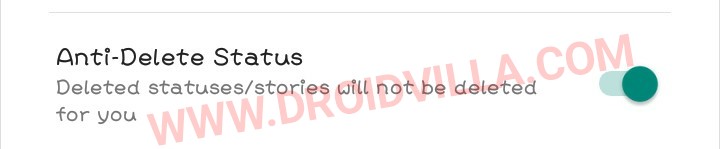
Before making a post on whatsapp you have to be certain of what you want to post, just so you don’t mistakenly post something you wouldn’t want to post, because many whatsapp contacts uses a MOD version and whenever you make any whatsapp update and deletes it, your status only gets deleted on those using the Official whatsapp, while those using a MOD version still have that particular status update available. Trust me when I say 80% of your contacts all use whatsapp MOD.
Be careful before updating your whatsapp status or sending whatsapp messages: Read why


So, if you mistakenly upload private or personal pictures or videos, you just have to wait for a long 24hours before it gets automatically deleted from every other user ends.


Also

We also have the anti delete message features which makes MOD users ahead of those using the official whatsapp. As the name implies, this feature makes it possible for Official whatsapp users not to be able to delete a message sent. Meaning that, if a user mistakenly sends a message to a wrong contact or group, he or she will not be able to delete it for everyone.


Image of when a user is eligible to delete for everyone

Be careful before updating your whatsapp status or sending whatsapp messages: Read why
This is how it looks when a user is eligible to delete a message sent for everyone.


Image of when a user is not eligible to delete for everyone

Be careful before updating your whatsapp status or sending whatsapp messages: Read why
Now you can see the Delete for everyone is no more there.  So those who have this feature enabled can not be affected by the delete for everyone. Nevertheless, there more whatsapp mod who also have similar feature named Anti Revoke, when enabled all messages deleted for everyone gets revoked automatically and for shre will get their user notified when a contact deletes a message. 


Now you know about the scary part of a whatsapp MOD user, you should be careful and more conscious while making updates to status and sending messages.
Don’t forget to share below using the share button, and for sure do subscribe to our newsletter for instant mail update delivery. We guarantee you spam free!
Tags: NewsTipsTricksWhatsapp
SendShare373Tweet233Share
Droidvilla Admin

Droidvilla Admin

I am Nnoka Godswill also known as Favtechblogger. Lover of Android/Technology, a passionate tech content creator with over 5 years + of blogging experience, an SEO god, a Marketer, and a graduate of Electronics and Computer Engineering from the University of Port Harcourt . Email the author at favtechblogger@gmail.com.

Related Stories

DSTV Now App Not Showing Live Channels

DSTV Now Error: 1 Fix to DSTV Now App Not Showing Live Channels

by Droidvilla Admin
January 14, 2024
0

@dstvcareFinally, here is a solution to fix the dstv now error app not showing live channels when a subscription is active. The dstv now error suddenly do not show/display...

cheat db ppsspp

How to use cheats on ppsspp: Download cheat db PPSSPP Android Games Cheat file

by Droidvilla Admin
December 24, 2023
1

How to use cheats on ppsspp: Download cheat db PPSSPP Android Games Cheat file Good news to all ppsspp (iso) Android game fans. Droidvilla Technology Solution will show...

pixellab font download

Top 100+ Free pixellab font download: How To Import Fonts Into PixelLab

by Droidvilla Admin
April 13, 2023
6

Enjoy this free  100+ pixellab font download. Being a graphic designer is one thing and getting the right fonts for your clients or design job is another thing,...

fast GLO APN settings

Latest fast GLO APN settings for android and iPhone

by Droidvilla Admin
March 18, 2023
15

Enjoy fast glo apn settings configuration for 3g and 4g browsing/Download speed. We have heard so many complaints about GLO and its snail browsing connection and download speed,...

Next Post
How To Migrate To Airtel SmartTalk 2.0 Tariff Plan

How To Migrate To Airtel SmartTalk 2.0 Tariff Plan

Leave a Reply Cancel reply

Your email address will not be published. Required fields are marked *

  • About
  • Advertise
  • Privacy & Policy
  • Contact Us
  • Disclaimer

© 2026 JNews - Premium WordPress news & magazine theme by Jegtheme.

Welcome Back!

Login to your account below

Forgotten Password?

Retrieve your password

Please enter your username or email address to reset your password.

Log In
No Result
View All Result
  • Apk apps
  • Android Tips/Tricks
  • Phone Reviews
  • How To
  • Phone Reviews

© 2026 JNews - Premium WordPress news & magazine theme by Jegtheme.