AI News
  • Apk apps
  • Android Tips/Tricks
  • Phone Reviews
  • How To
  • Phone Reviews
No Result
View All Result
AI News
  • Apk apps
  • Android Tips/Tricks
  • Phone Reviews
  • How To
  • Phone Reviews
No Result
View All Result
AI News
No Result
View All Result
Get eligible for airtel N200 for 4.6gig: 2019 working trick

Get eligible for airtel N200 for 4.6gig: 2019 working trick

Droidvilla Admin by Droidvilla Admin
July 10, 2021
in Airtel, Android Tips/Tricks, Apk apps
13
931
SHARES
3k
VIEWS
Share on whatsappShare on FacebookShare on TwitterShare on Telegram
Get eligible for airtel N200 for 4.6gig: 2019 working trick

Pretty sure lots of you are already enjoying the trick and many are also not happy because they weren’t eligible for this offer.

Good news we bring to you this morning. (Weeping may endure for a night, But joy comes in the morning.), obviously the saying is true just as we bring to your notice a trick on how to get eligible for Airtel N200 4.6gb.

 How Can I Get Eligible:

Ever tried the previous method and yet didn’t work for you, try plan B and it should work just fine.
Also READ: Plan A 


Follow procedures :

Migrate to Airtel Smart Trybe Tariff plan by dialling USSD *312#,  you can  check your current tariff plan by dialling *121*3*5#. 
Note: If you are already subscribed to SmartTrybe tariff plan, proceed to next guide.
Now, send GET to 141 
Also send MIFI to 141 as SMS (text message 💭) 
On successful following all steps accordingly, simple buy a paper recharge card of N200 and load. Simply confirm your data balance by dialling USSD *140#.
TELL ME WHAT YOU SEE😉!
Get eligible for airtel N200 for 4.6gig: 2019 working trick

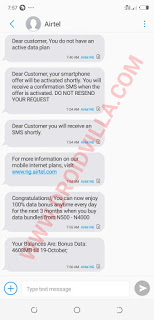
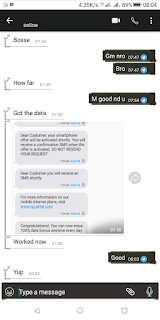
You should for sure see 4.6gb and guess what?  Your airtime still intact like magic.
Feel free to drop a comment If you experience any issues.
You can as well decide to join our active telegram group for instant assistance by our active members. Join Here


Don’t forget to share below using the share button, and for sure do subscribe to our newsletter for instant mail update delivery. We guarantee you spam free!
Tags: Free browsing cheats and updatesTipsTricks
SendShare372Tweet233Share
Droidvilla Admin

Droidvilla Admin

I am Nnoka Godswill also known as Favtechblogger. Lover of Android/Technology, a passionate tech content creator with over 5 years + of blogging experience, an SEO god, a Marketer, and a graduate of Electronics and Computer Engineering from the University of Port Harcourt . Email the author at favtechblogger@gmail.com.

Related Stories

DSTV Now App Not Showing Live Channels

DSTV Now Error: 1 Fix to DSTV Now App Not Showing Live Channels

by Droidvilla Admin
January 14, 2024
0

@dstvcareFinally, here is a solution to fix the dstv now error app not showing live channels when a subscription is active. The dstv now error suddenly do not show/display...

cheat db ppsspp

How to use cheats on ppsspp: Download cheat db PPSSPP Android Games Cheat file

by Droidvilla Admin
December 24, 2023
1

How to use cheats on ppsspp: Download cheat db PPSSPP Android Games Cheat file Good news to all ppsspp (iso) Android game fans. Droidvilla Technology Solution will show...

pixellab font download

Top 100+ Free pixellab font download: How To Import Fonts Into PixelLab

by Droidvilla Admin
April 13, 2023
6

Enjoy this free  100+ pixellab font download. Being a graphic designer is one thing and getting the right fonts for your clients or design job is another thing,...

fast GLO APN settings

Latest fast GLO APN settings for android and iPhone

by Droidvilla Admin
March 18, 2023
15

Enjoy fast glo apn settings configuration for 3g and 4g browsing/Download speed. We have heard so many complaints about GLO and its snail browsing connection and download speed,...

Next Post
How to activate airtel 4.6gig for N200: Hurry now

How to activate airtel 4.6gig for N200: Hurry now

Comments 13

  1. Anonymous says:
    6 years ago

    Thanks. Worked after long try

    Reply
    • Nnoka Godswill (verified) says:
      6 years ago

      Good it worked

      Reply
  2. Unknown says:
    6 years ago

    Mine didn't work i didn't get the DAT after following plan B

    Reply
    • Nnoka Godswill (verified) says:
      6 years ago

      Did you check the date of registration and ensured it wasn't more than months?

      Reply
  3. Victor royal says:
    6 years ago

    Will I get any message from Airtel Network

    Reply
    • Nnoka Godswill (verified) says:
      6 years ago

      After going through the steps, recharge your phone. After successful recharge, exit and dial *140# to view your data balance.

      Reply
  4. Anonymous says:
    6 years ago

    Thanks a bunch for this info. Really a great piece!

    Reply
    • Nnoka Godswill (verified) says:
      6 years ago

      You are welcome

      Reply
  5. Victor royal says:
    6 years ago

    I did that and still yet no data was given to me ….it didn't work for me

    Reply
    • Nnoka Godswill (verified) says:
      6 years ago

      Blocked already sir.

      Reply
  6. Victor royal says:
    6 years ago

    I did that and still yet no data was given to me ….it didn't work for me… after dialing *140# all I get was …. customer u do not have an active Data plan

    Reply
    • Nnoka Godswill (verified) says:
      6 years ago

      It has been blocked already.

      Reply
  7. Unknown says:
    6 years ago

    hmmmm

    Reply

Leave a Reply Cancel reply

Your email address will not be published. Required fields are marked *

  • About
  • Advertise
  • Privacy & Policy
  • Contact Us
  • Disclaimer

© 2025 JNews - Premium WordPress news & magazine theme by Jegtheme.

Welcome Back!

Login to your account below

Forgotten Password?

Retrieve your password

Please enter your username or email address to reset your password.

Log In
No Result
View All Result
  • Apk apps
  • Android Tips/Tricks
  • Phone Reviews
  • How To
  • Phone Reviews

© 2025 JNews - Premium WordPress news & magazine theme by Jegtheme.