AI News
  • Apk apps
  • Android Tips/Tricks
  • Phone Reviews
  • How To
  • Phone Reviews
No Result
View All Result
AI News
  • Apk apps
  • Android Tips/Tricks
  • Phone Reviews
  • How To
  • Phone Reviews
No Result
View All Result
AI News
No Result
View All Result
Best Way To Answer Calls Using Google Assistant 2021

Best Way To Answer Calls Using Google Assistant 2021

Xavi by Xavi
November 29, 2021
in Google, Apk apps, Applications, How To
0
932
SHARES
3k
VIEWS
Share on whatsappShare on FacebookShare on TwitterShare on Telegram

Google’s digital assistant, Google Assistant has been around for some time now. It does things you would expect from an assistant, such as answering your questions about the weather, setting timers, creating calendar timers, etc.

More features has been added by Google over the years. Here, we’re talking about being able to stay on the line for you when you’re being put on hold by customer service and other advanced features.

So, it was really surprising that it was earlier part of 2021 that the ability for users to use voice control to answer or reject calls was introduced by Google.

How To Answer Or Reject Incoming Calls Using Google Assistant

We take it that it’s better late then never, but if you have been wondering how to answer or reject incoming calls on your phone using Google Assistant, keep reading.

  • Hey Google, answer call
  • Hey Google, reject call

These phrases are enough to get the digital assistant to either answer or reject your incoming call.

This is useful if your hands are dirty and you don’t want to touch your phone or if your hands are full and you can’t get your phone at that moment.

This works best with a headset as it does not put the call on speaker automatically. You also have to make sure the “Hey Google” detection is enabled.

Here’s how to turn it on if you disabled it for whatever reason:

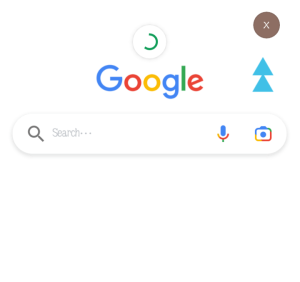
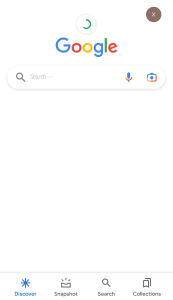
  • Step 1 : Launch the Google app on your phone
Google Assistant
Open Google App
  • Step 2 : Tap your profile photo
Google Assistant
Click On Profile Photo
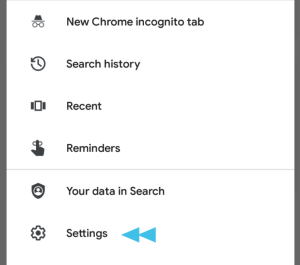
  • Step 3 : Go to Settings
Google Assistant
Go To Settings
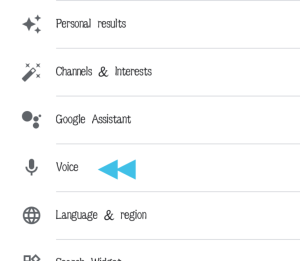
  • Step 4: Click on voice
Google Assistant
Click On Voice
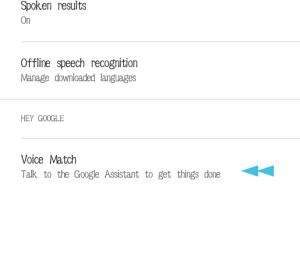
  • Step 4:  Right under “Hey Google” select “Voice Match”
Google Assistant
Click On Voice Match
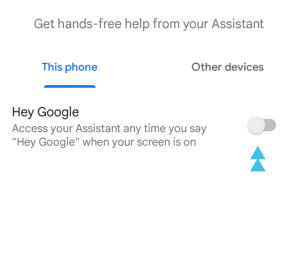
  • Step 5 : Turn on “Hey Google”
Google Assistant
Turn On Hey Google

That’s all there is to it! I hope this helps.

Join Us On Telegram For More Exciting Updates

https://t.me/droidvilla


Tags: Answer CallsGoogleGoogle AssistantHey GoogleVoice
SendShare373Tweet233Share
Xavi

Xavi

I am Pepple Xavier also known as Blaze, a Droidvilla content creator, A 400 level student in the University of Port Harcourt, studying Mechatronics Engineering. Found passion in technology ⚙ and decided to keep the world in touch with latest happenings around the world of technology. Visit us for daily tips and tricks, How To's and lots more www.droidvilla.com have to offer

Related Stories

Download/Save Disabled TikTok Videos to Gallery

How to Download/Save Disabled TikTok Videos to Gallery

by Droidvilla Admin
April 27, 2024
0

- How to Download/Save Disabled TikTok Videos to Gallery - Funny TikTokers to follow TikTok is the go-to social media app for content creators and enthusiasts alike, with...

WhatsApp 60sec Video Status Length Upload

WhatsApp 60sec Video Status Length Upload

by Droidvilla Admin
April 26, 2024
0

WhatsApp 60sec Video Status Length Upload : A Game-Changer for Users! WhatsApp, known for its user-centric approach and frequent updates, has done it again! With the latest update,...

know your GOtv login details

How to Know your GOTV login details (Surname and Phone Number) if forgotten

by Droidvilla Admin
January 22, 2024
1

- How to know your GOtv login details (Surname and Phone Number) if forgotten Hi there, did you forget your login details associated with GOtv and you're looking...

resubmit Pi KYC in 2024

How to resubmit Pi KYC in 2024 and get approval in minutes

by Droidvilla Admin
January 18, 2024
0

Pi has recently given all pioneers the opportunity to resubmit Pi KYC in 2024 after a very long wait. For all those who waited for this long to...

Next Post
MTN N200 For 2GB YouTube Subscription Plan Video Pack

MTN N200 For 2GB YouTube Subscription Plan Video Pack

Leave a Reply Cancel reply

Your email address will not be published. Required fields are marked *

  • About
  • Advertise
  • Privacy & Policy
  • Contact Us
  • Disclaimer

© 2026 JNews - Premium WordPress news & magazine theme by Jegtheme.

Welcome Back!

Login to your account below

Forgotten Password?

Retrieve your password

Please enter your username or email address to reset your password.

Log In
No Result
View All Result
  • Apk apps
  • Android Tips/Tricks
  • Phone Reviews
  • How To
  • Phone Reviews

© 2026 JNews - Premium WordPress news & magazine theme by Jegtheme.