AI News
  • Apk apps
  • Android Tips/Tricks
  • Phone Reviews
  • How To
  • Phone Reviews
No Result
View All Result
AI News
  • Apk apps
  • Android Tips/Tricks
  • Phone Reviews
  • How To
  • Phone Reviews
No Result
View All Result
AI News
No Result
View All Result
How To Force 4g Mode Only On Your 4g Enabled Android Device

How To Force 4g Mode Only On Your 4g Enabled Android Device

Droidvilla Admin by Droidvilla Admin
July 10, 2021
in Android Tips/Tricks, How To
8
936
SHARES
3k
VIEWS
Share on whatsappShare on FacebookShare on TwitterShare on Telegram
Force enable 4g android
4g Mode only! 
Finally the days of 2g/3g/4g or 3g/4g mode only is over and the era of 4g and yet 5g to be fully active is come. 
I will be giving you a 100% safe mode and easy step on how to Force 4g Mode only your android 4g enabled device to experience max speed while surfing the internet and to avoid data connection throttling from 4g to 3g.

Here is a quick guide on how to force 4g mode Only on Your android Device [No Root] 

#Note: Make sure your device is 4g enabled to be able to force 4g mode Only on your android device.
Follow steps below :
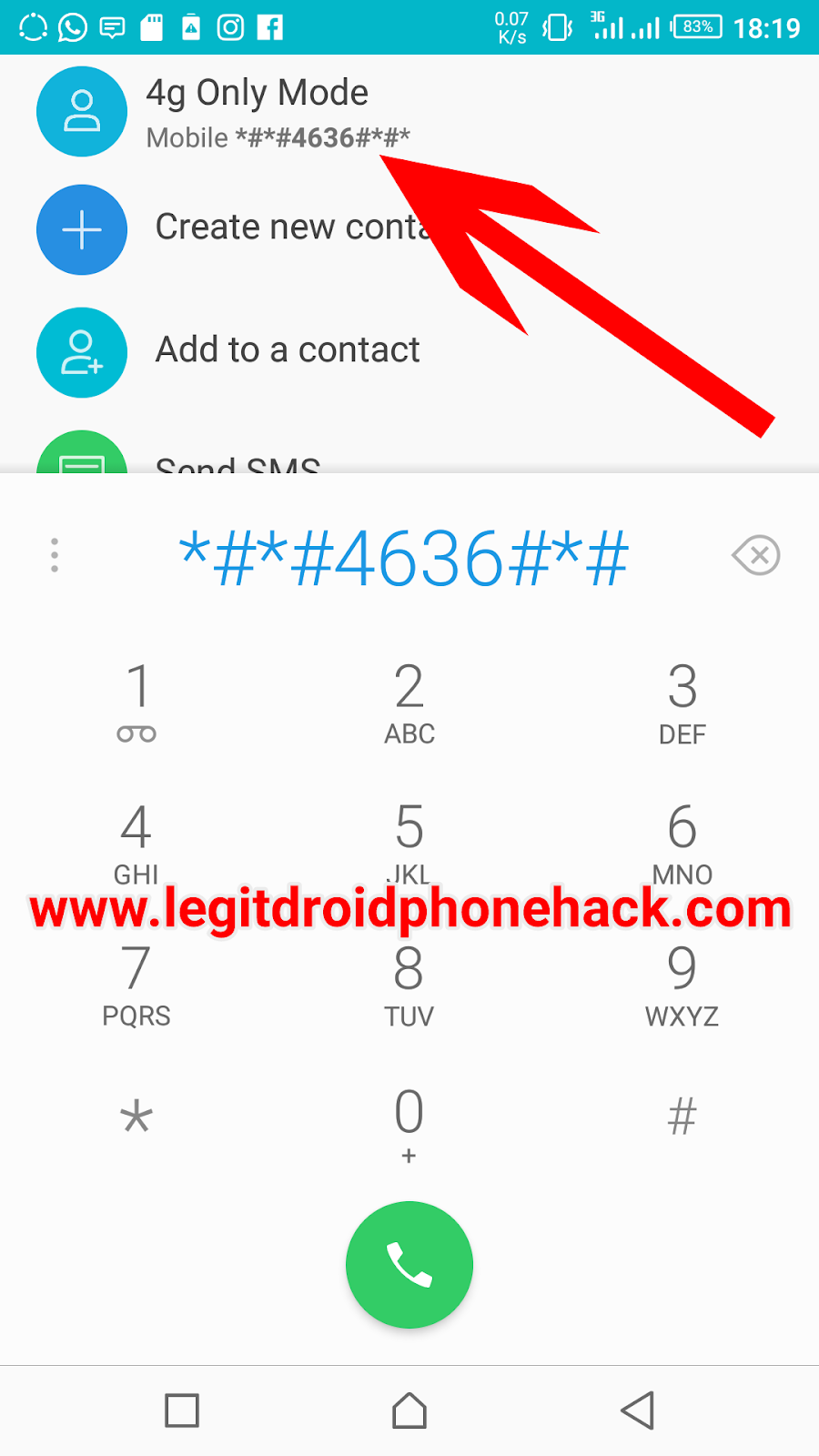
  • Open your phones dialer
  • Dial *#*#4636#*#*
Force enable 4g android
USSD code 
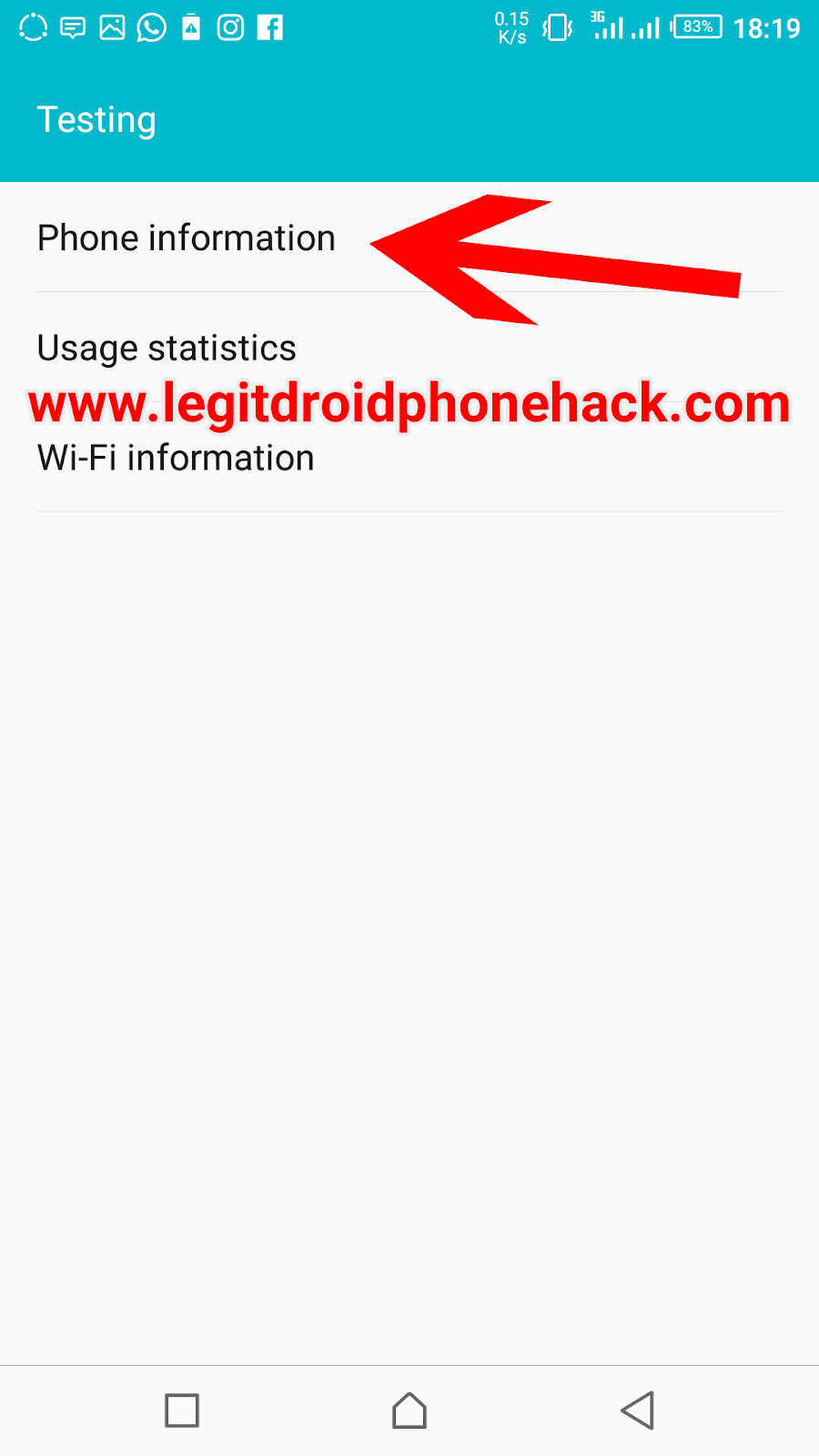
  • A new screen will be shown with 3 options. 
  • Choose Option of Phone 📱 Information.
Android 4g only mode
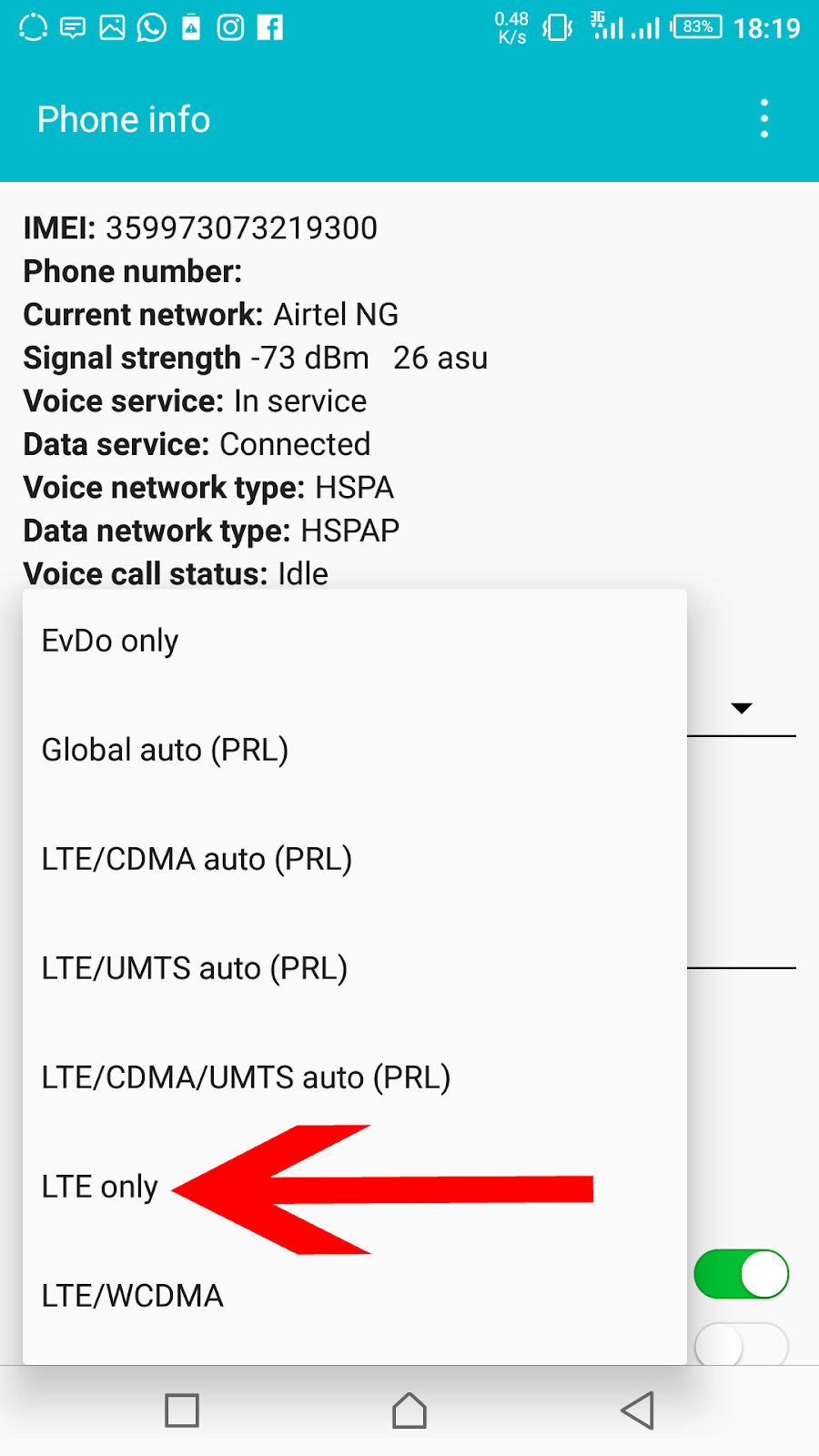
  • Then you should be able to see your phones information and  preferred network type. 
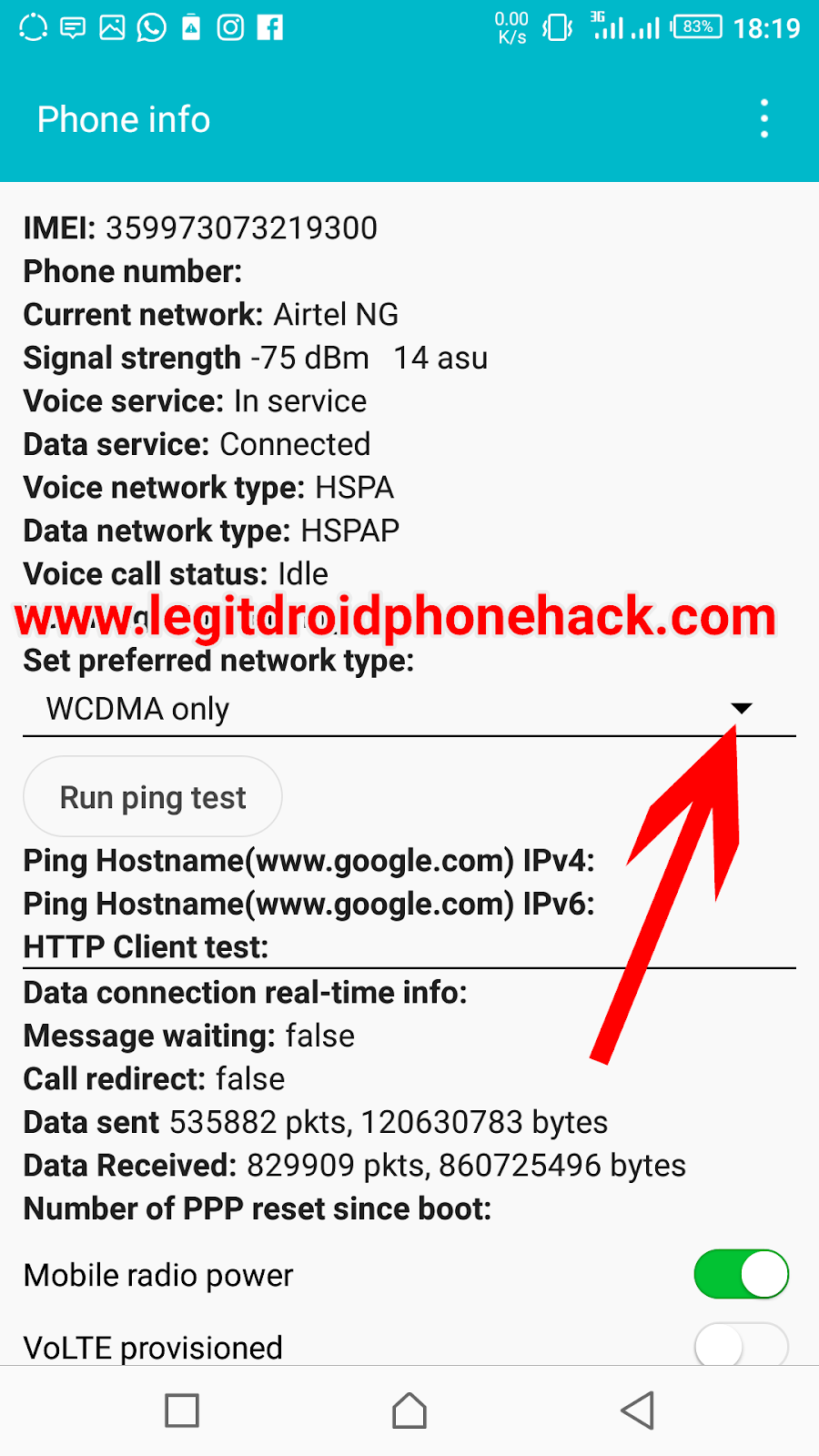


Android 4g only mode
Select LTE mode
  • Now open preferred network type and you should see lots of options. 
  • Scroll to where you see LTE only .
Android 4g only mode
LTE mode Only
  • When done you have successfully activated 4g mode only.
Android 4g only mode
Done


If your android device doesn’t change after following due to process, then you should know your android device isn’t 4G enabled, because this tricks force 4g mode only on 4g supported devices.

(Mine didn’t change in status bar because my phone isn’t a 4g enabled device). 

After your have successfully forced enabled 4g mode only on your Android device, Now you can browse with full backup assurance of no switching into 2g or 3g while surfing the net.
Experience speed and stability with 4g LTE enabled mode only. 

Don’t forget to drop a comment.
Droidvilla.com gaht you covered!!
Don’t be left behind.
Join our Telegram Channel
Join Telegram Group
Tags: 4g mode only4g mode only androidAndroid 4g mode onlyAndroid Hacksforce enable 4g mode onlyhow to force enable 4g mode onlyTips
SendShare374Tweet234Share
Droidvilla Admin

Droidvilla Admin

I am Nnoka Godswill also known as Favtechblogger. Lover of Android/Technology, a passionate tech content creator with over 5 years + of blogging experience, an SEO god, a Marketer, and a graduate of Electronics and Computer Engineering from the University of Port Harcourt . Email the author at favtechblogger@gmail.com.

Related Stories

Download/Save Disabled TikTok Videos to Gallery

How to Download/Save Disabled TikTok Videos to Gallery

by Droidvilla Admin
April 27, 2024
0

- How to Download/Save Disabled TikTok Videos to Gallery - Funny TikTokers to follow TikTok is the go-to social media app for content creators and enthusiasts alike, with...

know your GOtv login details

How to Know your GOTV login details (Surname and Phone Number) if forgotten

by Droidvilla Admin
January 22, 2024
1

- How to know your GOtv login details (Surname and Phone Number) if forgotten Hi there, did you forget your login details associated with GOtv and you're looking...

resubmit Pi KYC in 2024

How to resubmit Pi KYC in 2024 and get approval in minutes

by Droidvilla Admin
January 18, 2024
0

Pi has recently given all pioneers the opportunity to resubmit Pi KYC in 2024 after a very long wait. For all those who waited for this long to...

DSTV Now App Not Showing Live Channels

DSTV Now Error: 1 Fix to DSTV Now App Not Showing Live Channels

by Droidvilla Admin
January 14, 2024
0

@dstvcareFinally, here is a solution to fix the dstv now error app not showing live channels when a subscription is active. The dstv now error suddenly do not show/display...

Next Post
Free airtime: How to get free N2000 airtime and more on FLOM

Free airtime: How to get free N2000 airtime and more on FLOM

Comments 8

  1. Gee says:
    7 years ago

    Let me try it …thanks bro

    Reply
    • Nnoka Godswill (verified) says:
      7 years ago

      You are welcome

      Reply
  2. Nino says:
    7 years ago

    Didn't work for me, Samsung galaxy S5

    Reply
    • Nnoka Godswill (verified) says:
      7 years ago

      Did it get up to those options on this post?

      Reply
  3. Hillaboy says:
    7 years ago

    Worked

    Reply
    • Nnoka Godswill (verified) says:
      7 years ago

      Good. Thanks for review

      Reply
  4. Stephen jnr1 says:
    6 years ago

    Anytime I try to do that it won't come up and my signal bar will just go off …can't be able to really enjoy the Glo unlimited with this 3g network here and am using infinix s4 plz kindly help out I really need the 4g

    Reply
    • Nnoka Godswill (verified) says:
      6 years ago

      Glo 4g is really difficult to pop out. Its bandwidth for 4g comes up on few selected devices.

      Reply

Leave a Reply Cancel reply

Your email address will not be published. Required fields are marked *

  • About
  • Advertise
  • Privacy & Policy
  • Contact Us
  • Disclaimer

© 2025 JNews - Premium WordPress news & magazine theme by Jegtheme.

Welcome Back!

Login to your account below

Forgotten Password?

Retrieve your password

Please enter your username or email address to reset your password.

Log In
No Result
View All Result
  • Apk apps
  • Android Tips/Tricks
  • Phone Reviews
  • How To
  • Phone Reviews

© 2025 JNews - Premium WordPress news & magazine theme by Jegtheme.