If you have ever tried opening some sites to fill in forms and suddenly the page zooms up. This post stops the automatic force enable zoom 🔎 on all chrome versions.
Follow guide:
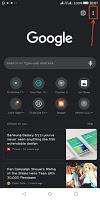
💭 Click the three dotted icon (see image)
 |
| Chrome |
This setting also stops zooming while trying to copy text from sites.
Now users can disable the force enable zoom 🔎 in of sites.
Prevents sites from zooming in without permission.
Simply follow steps below to prevent sites from zooming in automatically!
Image guide:


Follow guide:
💭 Click the three dotted icon (see image)
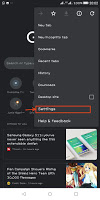
💭 Go to settings
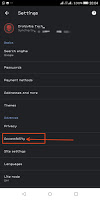
💭 Accessibility
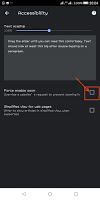
💭 Now tick on the Force Enable Zoom 🔎.
Now when done, simply visit back those sites that automatically zooms in, observe automatic zooming have been disabled.
💭 Accessibility
💭 Now tick on the Force Enable Zoom 🔎.
Now when done, simply visit back those sites that automatically zooms in, observe automatic zooming have been disabled.
Droidvilla