AI News
  • Apk apps
  • Android Tips/Tricks
  • Phone Reviews
  • How To
  • Phone Reviews
No Result
View All Result
AI News
  • Apk apps
  • Android Tips/Tricks
  • Phone Reviews
  • How To
  • Phone Reviews
No Result
View All Result
AI News
No Result
View All Result
How to qualify for MTN WBACK data subscription #200 for 1gig

How to qualify for MTN WBACK data subscription #200 for 1gig

Droidvilla Admin by Droidvilla Admin
July 14, 2021
in Android Tips/Tricks, How To, MTN
3
932
SHARES
3k
VIEWS
Share on whatsappShare on FacebookShare on TwitterShare on Telegram
For those who havenโ€™t yet been qualified for the WBACK data subscription can now be qualified.
Continue reading ๐Ÿ‘‡๐Ÿ‘‡
How to qualify for MTN WBACK data subscription #200 for 1gig

Contents hide
I. How to check qualification status
I.I. Note:
I.I.I. Note:
People who were qualified at some point are no more qualified for the WBACK data subscription.
Also those who were getting not qualified messages are now being qualified. 

How to check qualification status

Note:

You donโ€™t need to have #200 before checking qualification,
Simply dial *131*65# and choose any available plan.
If you are qualified you will get a message that operation failed due to insufficient balance if you donโ€™t have have up to the airtime for the subscription you choosed.
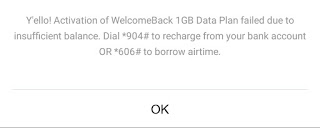
How to qualify for MTN WBACK data subscription #200 for 1gig


Now simply recharge and do any available subscription of your choice. 
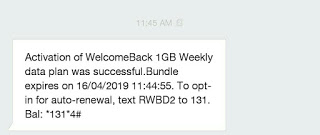
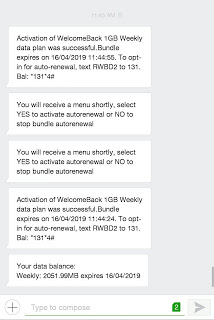
You should get a successful message below
How to qualify for MTN WBACK data subscription #200 for 1gig

For those who arenโ€™t qualified will get a sorry message of  not been qualified for WBACK data.
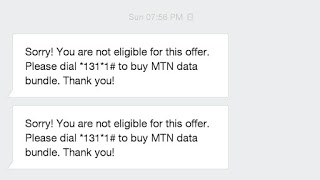
How to qualify for MTN WBACK data subscription #200 for 1gig

Note:

  1. Observe date of not qualified and also date of success message images above. 
  2. If you get not qualified message, always retry every day and I am sure of a successful message one day๐Ÿค—
  3. Data subscription can be accumulated, meaning that with #1000 you get whooping 6gig for a week. Or you can easily do monthly sub of 4gig which cost #1000 only.
  4. To check data, simply dial *131*4#
    How to qualify for MTN WBACK data subscription #200 for 1gig


Pretty sure this is a good start for all lucky folks.

Dont forget to share threadโ™ฅ๏ธ
Tags: How toMTNTips
SendShare373Tweet233Share
Droidvilla Admin

Droidvilla Admin

I am Nnoka Godswill also known as Favtechblogger. Lover of Android/Technology, a passionate tech content creator with over 5 years + of blogging experience, an SEO god, a Marketer, and a graduate of Electronics and Computer Engineering from the University of Port Harcourt . Email the author at favtechblogger@gmail.com.

Related Stories

Download/Save Disabled TikTok Videos to Gallery

How to Download/Save Disabled TikTok Videos to Gallery

by Droidvilla Admin
April 27, 2024
0

- How to Download/Save Disabled TikTok Videos to Gallery - Funny TikTokers to follow TikTok is the go-to social media app for content creators and enthusiasts alike, with...

know your GOtv login details

How to Know your GOTV login details (Surname and Phone Number) if forgotten

by Droidvilla Admin
January 22, 2024
1

- How to know your GOtv login details (Surname and Phone Number) if forgotten Hi there, did you forget your login details associated with GOtv and you're looking...

resubmit Pi KYC in 2024

How to resubmit Pi KYC in 2024 and get approval in minutes

by Droidvilla Admin
January 18, 2024
0

Pi has recently given all pioneers the opportunity to resubmit Pi KYC in 2024 after a very long wait. For all those who waited for this long to...

DSTV Now App Not Showing Live Channels

DSTV Now Error: 1 Fix to DSTV Now App Not Showing Live Channels

by Droidvilla Admin
January 14, 2024
0

@dstvcareFinally, here is a solution to fix the dstv now error app not showing live channels when a subscription is active. Theย dstv now error suddenly do not show/display...

Next Post
See the newly launched Infinix s4 specifications

See the newly launched Infinix s4 specifications

Comments 3

  1. Unknown says:
    7 years ago

    nd how does dis post hlp? rubbish

    Reply
    • Anonymous says:
      6 years ago

      Still working you fool

      Reply
  2. Prince K says:
    7 years ago

    Tried again it didn't work, but a friend tried his and it worked for him. I just have to keep trying each day fir mine. Thank you so much

    Reply

Leave a Reply Cancel reply

Your email address will not be published. Required fields are marked *

  • About
  • Advertise
  • Privacy & Policy
  • Contact Us
  • Disclaimer

© 2026 JNews - Premium WordPress news & magazine theme by Jegtheme.

Welcome Back!

Login to your account below

Forgotten Password?

Retrieve your password

Please enter your username or email address to reset your password.

Log In
No Result
View All Result
  • Apk apps
  • Android Tips/Tricks
  • Phone Reviews
  • How To
  • Phone Reviews

© 2026 JNews - Premium WordPress news & magazine theme by Jegtheme.