AI News
  • Apk apps
  • Android Tips/Tricks
  • Phone Reviews
  • How To
  • Phone Reviews
No Result
View All Result
AI News
  • Apk apps
  • Android Tips/Tricks
  • Phone Reviews
  • How To
  • Phone Reviews
No Result
View All Result
AI News
No Result
View All Result
How to speed up your Android 2019

How to speed up your Android 2019

Droidvilla Admin by Droidvilla Admin
July 10, 2021
in Android Tips/Tricks, Apk apps, How To
4
932
SHARES
3k
VIEWS
Share on whatsappShare on FacebookShare on TwitterShare on Telegram

How to speed up your Android 2019
Speed up your Android 
We can’t stop posting because we have thousands to pen down and funny enough we are yet to start 😂!
Today post is going to be fun and I am pretty sure all Android mobile users should be much interested in this one. Even if you are using a 6gig RAM device , you still have to read to know how to super boost your Android device speed and efficiency to maximum.
This is what we call Android tricks!
This is a hidden feature embedded in you Android device that can’t be accessed unless granted permission by system developers! How can you access this hidden feature is one and how to go about the hidden feature is another!
We shall be guiding you on how to access the feature, and before then we shall also guide you on how to grant developer permission to access the feature.

Good thing is that, we have got you covered at all times!


Having a slow android device or your minimizing from one app to another takes minutes to be successful. Droidvilla.com is here again to give you tips on how to boost your Android device to maximum without root access. 
This trick was originally checked and confirmed by me. Was later made available to members of our group to confirm process before publishing it out. 
It was later confirmed working and amazing how fast their Android became after following process.
Without further ado lets go straight to tutorials😉!! 
Easy steps on how to speed up your Android device
⭕ 100% safe and working.
⭕ Tested and confirmed!!


⚠️⚠️⚠️⚠️⚠️Attention!⚠️⚠️⚠️⚠️⚠️⚠️
For those who are already a developer, kindly JUMP to step 5.
NEWBIES in developer mode follow all steps below👇👇👇
Follow steps to get it done!
⭕ Go to settings⏩⏩
⭕Click on About phone⏩⏩
⭕Keep tapping on Build Number ( you should get a notification telling you that you are now a developer)..⏩⏩
⭕Go back and you should be able to see Developer Option before About Phone.⏩⏩
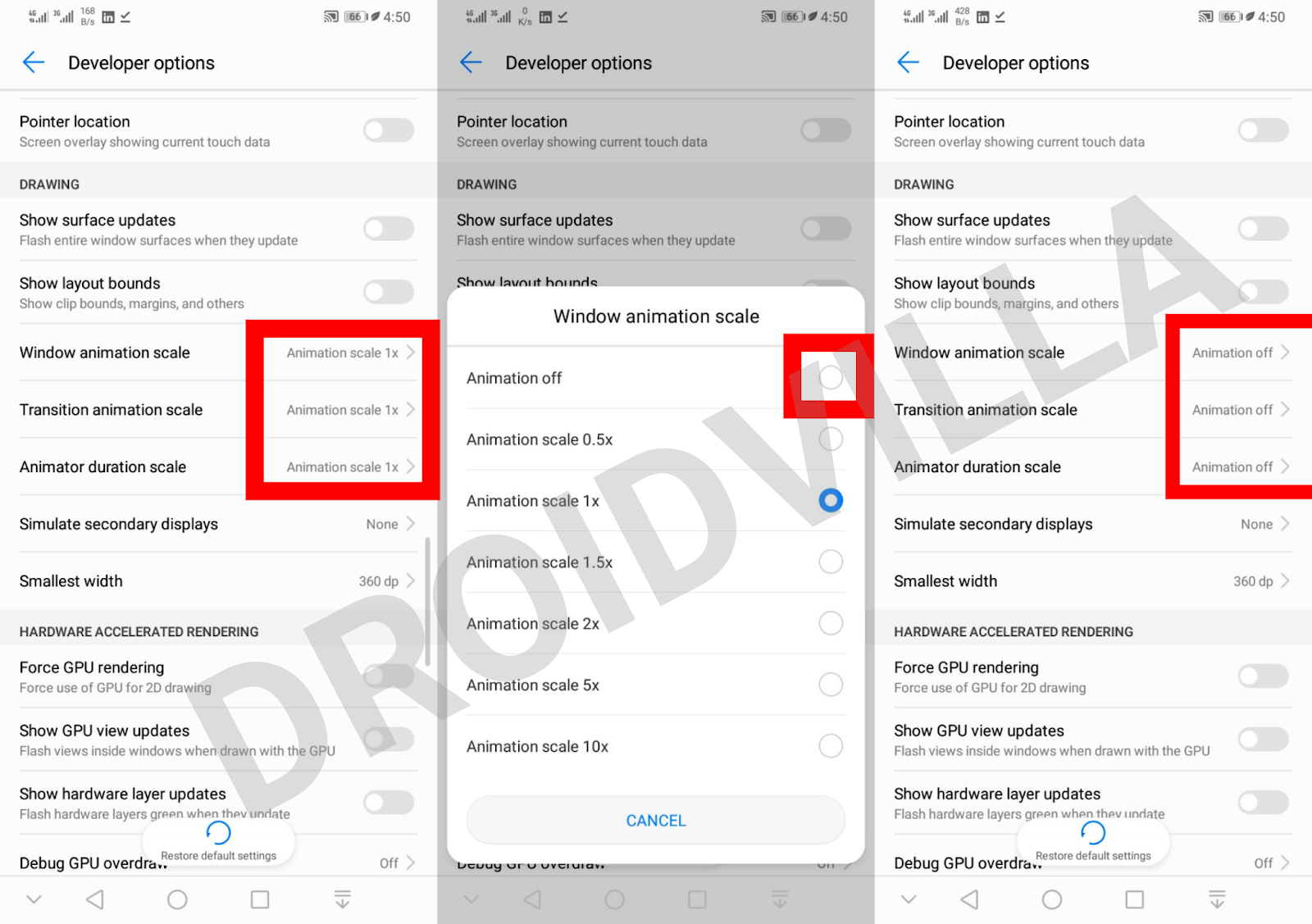
⭕Click on Developer Option and scroll down to where you see
⭕window animation scale.. Transition animation scale.. Animator duration scale.
⭕Simply turn them off

Image guide below
How to speed up your Android 2019
Guide
Congrats all set and ready! 


What happens next?
After successfully following all steps, here are changes to observe on your Android mobile device!
⭕Super fast minimizing switching
⭕Fast back button speed
⭕Super fast opening of applications
⭕ Switching from app to home now becomes faster
⭕ 100% faster screenshot speed and camera shot
⭕ Fast Device lock and unlocking via fingerprint and facelock.

Let us know how it works for you too and feel free to drop more observation from your end to help us get the post up to date for viewers.


Note: This trick is 100% safe and has no after effect attached to it!
We ensure what we publish is safe, tested and valid as at when posted!
Don’t forget to share with friends and give us a thumbs up! 
Follow ➕ us also to stay glued and equipped with lots of vital informations regarding your Android device and technology ⚙.
Thank you
Tags: Android HacksHow toTips
SendShare373Tweet233Share
Droidvilla Admin

Droidvilla Admin

I am Nnoka Godswill also known as Favtechblogger. Lover of Android/Technology, a passionate tech content creator with over 5 years + of blogging experience, an SEO god, a Marketer, and a graduate of Electronics and Computer Engineering from the University of Port Harcourt . Email the author at favtechblogger@gmail.com.

Related Stories

Download/Save Disabled TikTok Videos to Gallery

How to Download/Save Disabled TikTok Videos to Gallery

by Droidvilla Admin
April 27, 2024
0

- How to Download/Save Disabled TikTok Videos to Gallery - Funny TikTokers to follow TikTok is the go-to social media app for content creators and enthusiasts alike, with...

know your GOtv login details

How to Know your GOTV login details (Surname and Phone Number) if forgotten

by Droidvilla Admin
January 22, 2024
1

- How to know your GOtv login details (Surname and Phone Number) if forgotten Hi there, did you forget your login details associated with GOtv and you're looking...

resubmit Pi KYC in 2024

How to resubmit Pi KYC in 2024 and get approval in minutes

by Droidvilla Admin
January 18, 2024
0

Pi has recently given all pioneers the opportunity to resubmit Pi KYC in 2024 after a very long wait. For all those who waited for this long to...

DSTV Now App Not Showing Live Channels

DSTV Now Error: 1 Fix to DSTV Now App Not Showing Live Channels

by Droidvilla Admin
January 14, 2024
0

@dstvcareFinally, here is a solution to fix the dstv now error app not showing live channels when a subscription is active. The dstv now error suddenly do not show/display...

Next Post
Updated 9mobile 2.5gb HTTP configuration files 2019

Updated 9mobile 2.5gb HTTP configuration files 2019

Comments 4

  1. Hillaboy says:
    7 years ago

    Good one

    Reply
  2. Nnoka Godswill (verified) says:
    7 years ago

    Thanks

    Reply
  3. Unknown says:
    7 years ago

    Legit baba

    Reply
  4. Obomedaire Ese says:
    6 years ago

    Done

    Reply

Leave a Reply Cancel reply

Your email address will not be published. Required fields are marked *

  • About
  • Advertise
  • Privacy & Policy
  • Contact Us
  • Disclaimer

© 2025 JNews - Premium WordPress news & magazine theme by Jegtheme.

Welcome Back!

Login to your account below

Forgotten Password?

Retrieve your password

Please enter your username or email address to reset your password.

Log In
No Result
View All Result
  • Apk apps
  • Android Tips/Tricks
  • Phone Reviews
  • How To
  • Phone Reviews

© 2025 JNews - Premium WordPress news & magazine theme by Jegtheme.