
AI News
  • Apk apps
  • Android Tips/Tricks
  • Phone Reviews
  • How To
  • Phone Reviews
No Result
View All Result
AI News
  • Apk apps
  • Android Tips/Tricks
  • Phone Reviews
  • How To
  • Phone Reviews
No Result
View All Result
AI News
No Result
View All Result
How to speed up your android

Best Way To Speed Up Your Android 2023

How to speed up your android phone - Working method

Droidvilla Admin by Droidvilla Admin
January 18, 2023
in Android Tips/Tricks, Apk apps, How To
14
953
SHARES
3.1k
VIEWS
Share on whatsappShare on FacebookShare on TwitterShare on Telegram
Here are very useful tips and a step by step method on how to speed up your Android in 2023.

    There are times you just get pissed off when your phone lags or probably takes a long time to navigate between different apps, and this becomes pretty frustrating and you will definitely start having a mind in changing the said device, not knowing this can easily be fixed by customizing your device developer settings which help to speed up your Android device when successfully done.

    Contents hide
    I. How To Enable Android Developer Option
    II. How To Speed Up Your Android Device In 2023
    II.I. Also read: How to Reduce/Increase display Screen DPI size

    However, how to speed up your android customization settings is generally recommended and safe to explore as it has been tested for years now without having any side effects or worries.

    Droidvilla Tech has made everything quite easy as we also made provision of an image guide to ease understanding on how to speed up the android device in 2023 for those who might be going through this post for the first time.

    Note: How To Speed Up Your Android 2023 Is Been Tested and confirmed by Droidvilla Tech

    In other, for you to get to the developer settings, and speed up your Android device, you must first become a developer. Not to worry we got you covered, kindly follow the steps below

    For those who are already a developer JUMP to Howbtonspeed upnyour android device in 2023.

    How To Enable Android Developer Option

    You can become a developer or Enable the developer option on your android device by simply following the below steps.
    • Go to Android settings
    • Click on About phone
    • Keep tapping on Build Number ( you should get a notification telling you that you are now a developer).
    • Go back and you should be able to see  Developer Option before About Phone.

    How To Speed Up Your Android Device In 2023

    Congratulations you are now a developer, to speed up your Android, follow the steps below and customize your Developer options settings.

    1. After successfully becoming a developer 
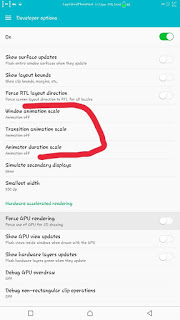
    2. Click on Developer Option and scroll down to where you see 
    • window animation scale
    • Transition animation scale
    • Animator duration scale

    Simply turn them off and close settings.
    How to speed up your android
    How to speed up your android

    When done, let us know how it works for you too.
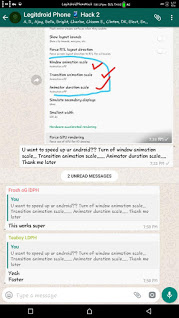
    Here are PROVES below on How To Speed Up Your Android Device 👇👇👇
    How to speed up your android
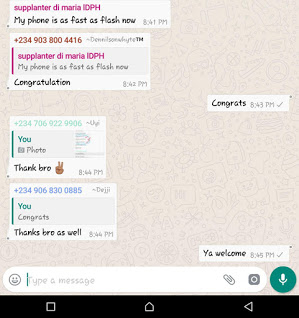
    Proves that steps on How to speed up your android works

    Also read: How to Reduce/Increase display Screen DPI size 
    How to speed up your android
    How to speed up your android
    If you find this helpful, kindly drop a comment below.
    Don’t forget to share below using the share button, and for sure do subscribe to our newsletter for instant mail update delivery. We guarantee your spam-free!
    Join Droidvilla Telegram Channel
    Tags: android developers optiondeveloperdevelopersdevelopers optionspeed android no rootSpeed up Android 2021
    SendShare381Tweet238Share
    Droidvilla Admin

    Droidvilla Admin

    I am Nnoka Godswill also known as Favtechblogger. Lover of Android/Technology, a passionate tech content creator with over 5 years + of blogging experience, an SEO god, a Marketer, and a graduate of Electronics and Computer Engineering from the University of Port Harcourt . Email the author at favtechblogger@gmail.com.

    Related Stories

    Download/Save Disabled TikTok Videos to Gallery

    How to Download/Save Disabled TikTok Videos to Gallery

    by Droidvilla Admin
    April 27, 2024
    0

    - How to Download/Save Disabled TikTok Videos to Gallery - Funny TikTokers to follow TikTok is the go-to social media app for content creators and enthusiasts alike, with...

    know your GOtv login details

    How to Know your GOTV login details (Surname and Phone Number) if forgotten

    by Droidvilla Admin
    January 22, 2024
    1

    - How to know your GOtv login details (Surname and Phone Number) if forgotten Hi there, did you forget your login details associated with GOtv and you're looking...

    resubmit Pi KYC in 2024

    How to resubmit Pi KYC in 2024 and get approval in minutes

    by Droidvilla Admin
    January 18, 2024
    0

    Pi has recently given all pioneers the opportunity to resubmit Pi KYC in 2024 after a very long wait. For all those who waited for this long to...

    DSTV Now App Not Showing Live Channels

    DSTV Now Error: 1 Fix to DSTV Now App Not Showing Live Channels

    by Droidvilla Admin
    January 14, 2024
    0

    @dstvcareFinally, here is a solution to fix the dstv now error app not showing live channels when a subscription is active. The dstv now error suddenly do not show/display...

    Next Post
    iPhone Battery : The Best 4 Tips For Delaying The Decline Of iPhone Batteries

    iPhone Battery : The Best 4 Tips For Delaying The Decline Of iPhone Batteries

    Comments 14

    1. Unknown says:
      7 years ago

      Nice1

      Reply
      • Nnoka Godswill (verified) says:
        7 years ago

        Cheers
        Enjoy

        Reply
    2. Emmanuel Mayowa says:
      7 years ago

      Nice one

      Reply
      • Nnoka Godswill (verified) says:
        7 years ago

        Thanks

        Reply
    3. Awesome says:
      7 years ago

      Waow just like that boom speed. Thanks so much

      Reply
      • Nnoka Godswill (verified) says:
        7 years ago

        You are welcome.. feel free to always drop by

        Reply
    4. Awajif says:
      7 years ago

      My phone is even faster than me now sef. Thank you so much

      Reply
      • Nnoka Godswill (verified) says:
        7 years ago

        Wow.. Happy it worked! Thanks for dropping by!!

        Reply
    5. 9JA360 says:
      7 years ago

      WOW IT works but I hope using developer options won't affect the phone negatively?

      Reply
      • Nnoka Godswill (verified) says:
        7 years ago

        No it doesn't… If encountered any in future, you can always disable developer options from settings.

        Reply
    6. meeky clicker says:
      6 years ago

      Oh my God.. Wow, thanks

      Reply
    7. Unknown says:
      6 years ago

      Real great to have been here. Thanks

      Reply
    8. Adaptsnews says:
      5 years ago

      Nice tips brotherly

      Reply
      • Nnoka Godswill (verified) says:
        5 years ago

        Thank you for comment.. One love

        Reply

    Leave a Reply Cancel reply

    Your email address will not be published. Required fields are marked *

    • About
    • Advertise
    • Privacy & Policy
    • Contact Us
    • Disclaimer

    © 2026 JNews - Premium WordPress news & magazine theme by Jegtheme.

    Welcome Back!

    Login to your account below

    Forgotten Password?

    Retrieve your password

    Please enter your username or email address to reset your password.

    Log In
    No Result
    View All Result
    • Apk apps
    • Android Tips/Tricks
    • Phone Reviews
    • How To
    • Phone Reviews

    © 2026 JNews - Premium WordPress news & magazine theme by Jegtheme.