
AI News
  • Apk apps
  • Android Tips/Tricks
  • Phone Reviews
  • How To
  • Phone Reviews
No Result
View All Result
AI News
  • Apk apps
  • Android Tips/Tricks
  • Phone Reviews
  • How To
  • Phone Reviews
No Result
View All Result
AI News
No Result
View All Result
Root Mediatek devices using SP Flash Tool

Root Mediatek devices using SP Flash Tool

Root Mediatek devices using SP Flash Tool 6+

Droidvilla Admin by Droidvilla Admin
August 5, 2022
in Android Tips/Tricks, How To
0
938
SHARES
3k
VIEWS
Share on whatsappShare on FacebookShare on TwitterShare on Telegram
Root Mediatek devices using SP Flash Tool

Here is one easy method to Root Mediatek devices using SP Flash Tool.

For those who are having difficulties in Rooting their devices using KingRoot and KingoRoot.

Would be making full detailed information on how to go about Rooting your Mediatek devices using SP Flash Tool.

For those who still don’t know about Rooting, I will plead you make research or you visit the previous post HERE, to know about it.

For those also willing to take the step, rest assured of well-detailed procedures to go about ROOTING.

All required materials needed will be made available tomorrow as I begin the process tonight to get everything set and ready.

Sorry for the long wait,  guess it’s time to take charge of your Android..

Finally, the steps are ready.

Root Mediatek devices using SP Flash Tool 6+

Tools: Download SP flash tool, SuperSu, and Mediatek USB VCOM Driver
The usefulness of Sp Flashtool

  • Flashing to Android stock-ROM (scatter-based)
  • Flash Custom ROM (scatter-based)
  • Application for Fixing Bricked device.
  • Advanced Memory testing and verifying.
  • Read / Write parameters.
  • Erasing / Formatting / Reset Your MTK-based device.
Requirements to Root Mediatek devices using SP Flash Tool 6+ :
  • A system/Laptop,  stable USB cord,  Drivers (Mediatek drivers) download above if you don’t have, Scatter Files and Files to be flashed.
    Phone compatible Recovery files: Kindly visit Google and search for your Phone compatible Recovery files (Hovatek  download is the best). When done proceed below.
    • Unzip the Spflashtool and you should see SP flash tool application.
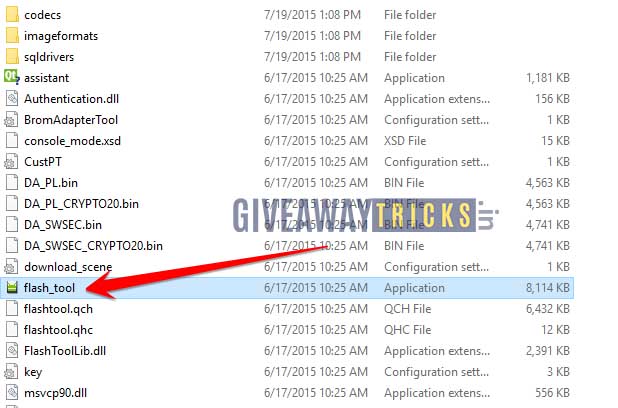
      Root Mediatek devices using SP Flash Tool
      Root Mediatek devices using SP Flash Tool

    • Open the Sp Flashtool and click on scatter-loading files, open and search for the unzipped Recovery folder choose on scatter file, and open.
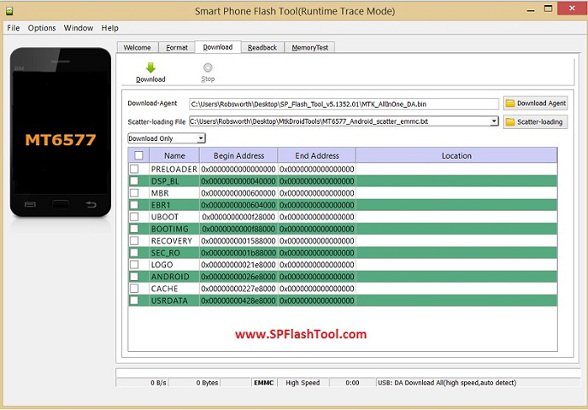
      Root Mediatek devices using SP Flash Tool
      Root Mediatek devices using SP Flash Tool

    • After importing, you should see the Recovery icon ticked on the screen.
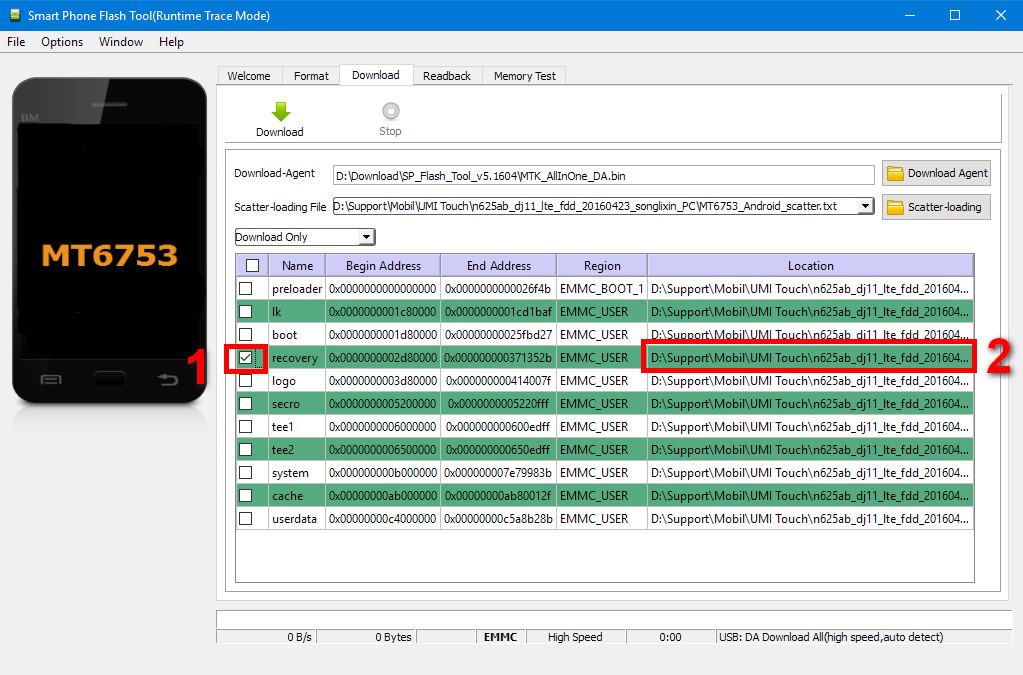
      Root Mediatek devices using SP Flash Tool
      Root Mediatek devices using SP Flash Tool

    Make sure you use your device-compatible Recovery scatter file. 
    • Click on download only and now you can click on Download at the top of the screen.
      When done you can now plug in your Android device.  (Note: Device must be switched off).
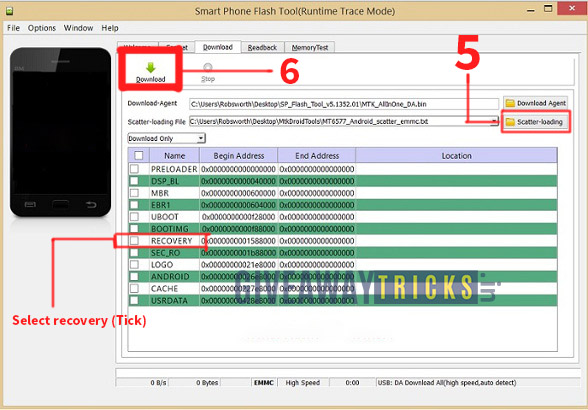
      Root Mediatek devices using SP Flash Tool
      Root Mediatek devices using SP Flash Tool

    When successfully flashed you should see a green circled ticked sign.
    Kindly unplug your device and go into phone recovery mode by Pressing power button and + volume button together.

    When done you should see the update zip from SDcard use the buttons to select, then locate your SuperSu zip file and open it.
    You should see updated successfully.

You can now reboot your device!

If you follow the steps accordingly am sure your device should be rooted.  Check for all your apps and you should see SuperSu.

Note:

NOTE: Make sure you know exactly what you are doing, if you have any difficulties or you don’t understand a particular step kindly join our official telegram channel/group below and we could do some picture tutorials if needed.

Try to get a backup of your files to your system in case anything goes wrong.

ALSO NOTE: Droidvilla wouldn’t be held responsible if your device gets bricked by this process.
Follow us on our socials found on the footer section.
Tags: Android HacksRoot Mediatek devicesRoot Mediatek devices using SP Flash ToolSP Flash Tool
SendShare375Tweet235Share
Droidvilla Admin

Droidvilla Admin

I am Nnoka Godswill also known as Favtechblogger. Lover of Android/Technology, a passionate tech content creator with over 5 years + of blogging experience, an SEO god, a Marketer, and a graduate of Electronics and Computer Engineering from the University of Port Harcourt . Email the author at favtechblogger@gmail.com.

Related Stories

Download/Save Disabled TikTok Videos to Gallery

How to Download/Save Disabled TikTok Videos to Gallery

by Droidvilla Admin
April 27, 2024
0

- How to Download/Save Disabled TikTok Videos to Gallery - Funny TikTokers to follow TikTok is the go-to social media app for content creators and enthusiasts alike, with...

know your GOtv login details

How to Know your GOTV login details (Surname and Phone Number) if forgotten

by Droidvilla Admin
January 22, 2024
1

- How to know your GOtv login details (Surname and Phone Number) if forgotten Hi there, did you forget your login details associated with GOtv and you're looking...

resubmit Pi KYC in 2024

How to resubmit Pi KYC in 2024 and get approval in minutes

by Droidvilla Admin
January 18, 2024
0

Pi has recently given all pioneers the opportunity to resubmit Pi KYC in 2024 after a very long wait. For all those who waited for this long to...

DSTV Now App Not Showing Live Channels

DSTV Now Error: 1 Fix to DSTV Now App Not Showing Live Channels

by Droidvilla Admin
January 14, 2024
0

@dstvcareFinally, here is a solution to fix the dstv now error app not showing live channels when a subscription is active. The dstv now error suddenly do not show/display...

Next Post
Hidden XHide Files

How To View Someone Hidden XHide Files

Leave a Reply Cancel reply

Your email address will not be published. Required fields are marked *

  • About
  • Advertise
  • Privacy & Policy
  • Contact Us
  • Disclaimer

© 2026 JNews - Premium WordPress news & magazine theme by Jegtheme.

Welcome Back!

Login to your account below

Forgotten Password?

Retrieve your password

Please enter your username or email address to reset your password.

Log In
No Result
View All Result
  • Apk apps
  • Android Tips/Tricks
  • Phone Reviews
  • How To
  • Phone Reviews

© 2026 JNews - Premium WordPress news & magazine theme by Jegtheme.