AI News
  • Apk apps
  • Android Tips/Tricks
  • Phone Reviews
  • How To
  • Phone Reviews
No Result
View All Result
AI News
  • Apk apps
  • Android Tips/Tricks
  • Phone Reviews
  • How To
  • Phone Reviews
No Result
View All Result
AI News
No Result
View All Result
Whatsapp Status Tips/Tricks and Hidden Features

Whatsapp Status Tips/Tricks and Hidden Features

Droidvilla Admin by Droidvilla Admin
July 10, 2021
in Android Tips/Tricks, Apk apps, How To
14
957
SHARES
3.1k
VIEWS
Share on whatsappShare on FacebookShare on TwitterShare on Telegram
whatsapp status tips
whatsapp status hidden feature 2020

Welcome once more to droidvilla tech as we shall be dropping whatsapp status tips and tricks you should know as a whatsapp user.
The Major reason WhatsApp users migrate to gbwhatsapp, is simply because of the ability of hiding viewed status and also disabling blue double ticked message and other privacy ๐Ÿ” features tips they think arenโ€™t available on the official WhatsApp Messenger.

Contents hide
I. What is WhatsApp?
II. Local man saying about whatsapp!
III. Whatsapp Status Tips and Hidden Features:
IV. Images steps!!!
V. Images of successfully disabling whatsapp Status view notification TIPs!
VI. Image of successfully disabling Blue message double tick icon TIPs!


First of all, I would like to break down what Whatsapp Is, just in case you are hitting to view this article for the first time before we shall proceed to showing you the status tips.

What is WhatsApp?

WhatsApp Messenger is a freeware, cross-platform messaging and Voice over IP service owned by Facebook, Inc. It allows users to send text messages and voice messages, make voice and video calls, and share images, documents, user locations, and other media. Wikipedia

Local man saying about whatsapp! 

Whatsapp messenger is a chat app that lets us communicate freely and connect to people all over the world at no extra charges. Whatsapp messenger uses the internet for its services.

Whatsapp Status Tips and Hidden Features:

If you have been wondering how to go about with the hidden status feature and blue tick โœ… features, or even to ghost your visibility on normal whatsapp messenger, good news just got to you as here is a summary of all whatsapp status tips and tricks in 2020.


Steps:
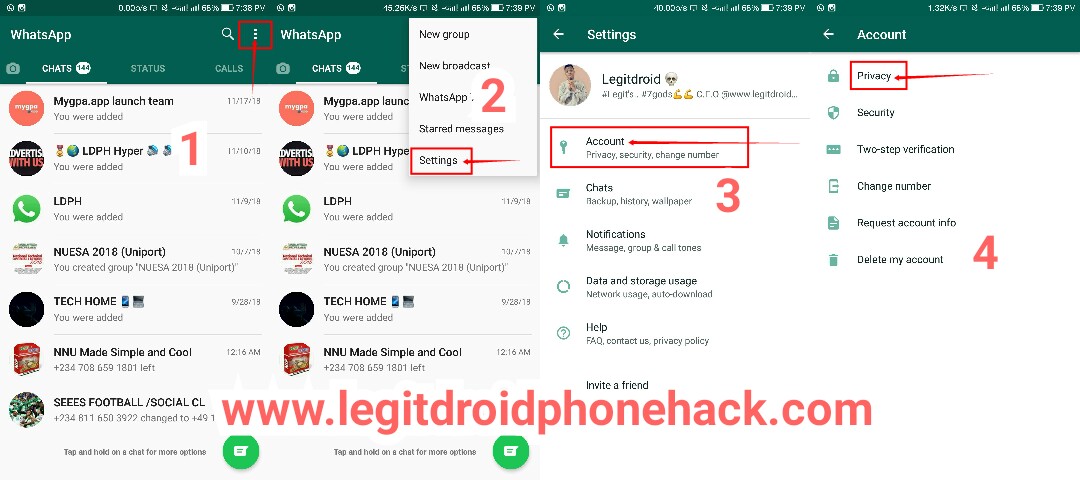
  1. Open your WhatsApp messenger
  2. Tap on the 3 dotted icon (image 1)
  3. Tap on settings (image 2)
  4. Tap on Account (image 3)
  5. Tap on Privacy (image 4)
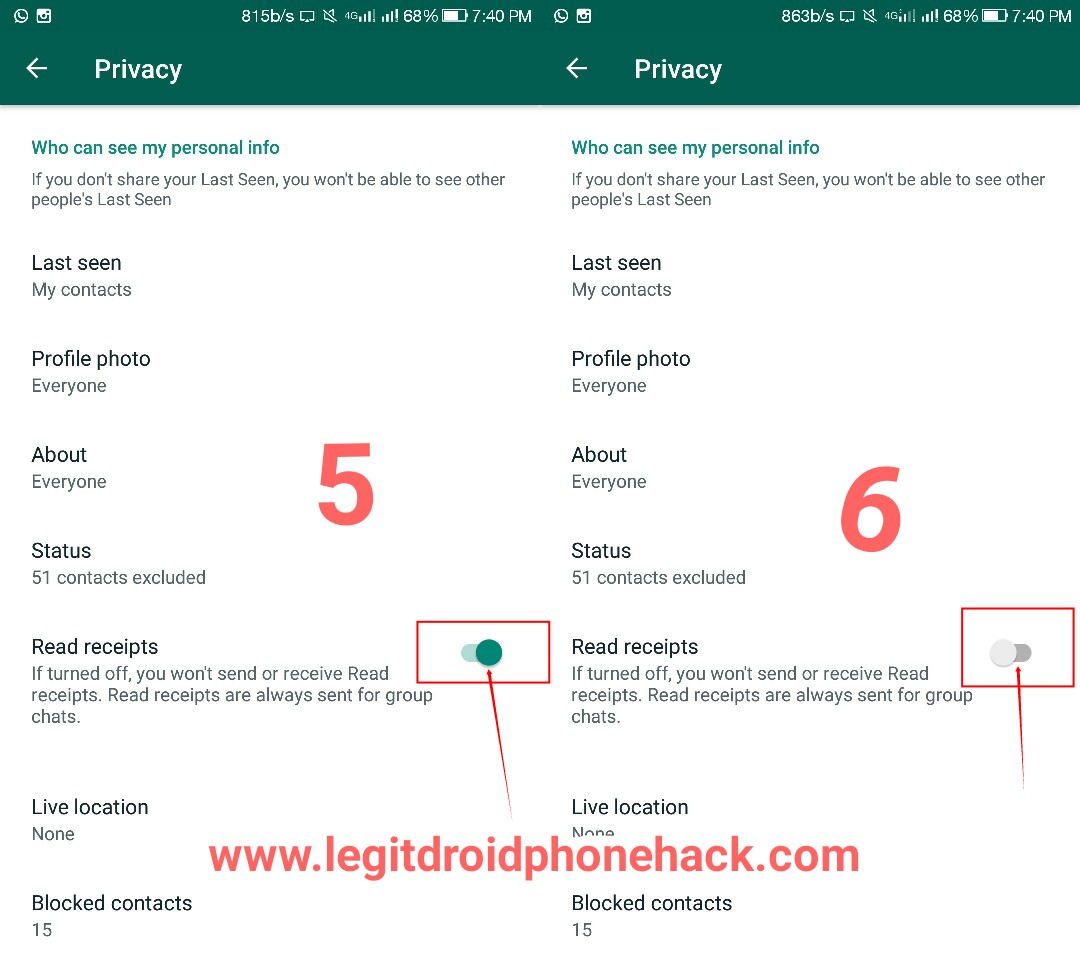
  6. Tap on read receipts to disable the feature. (Image 5 & 6)

Images steps!!!

whatsapp status tips
Steps 001
whatsapp status tips


Images of successfully disabling whatsapp Status view notification TIPs!

whatsapp status tips
Before
whatsapp status tips
After


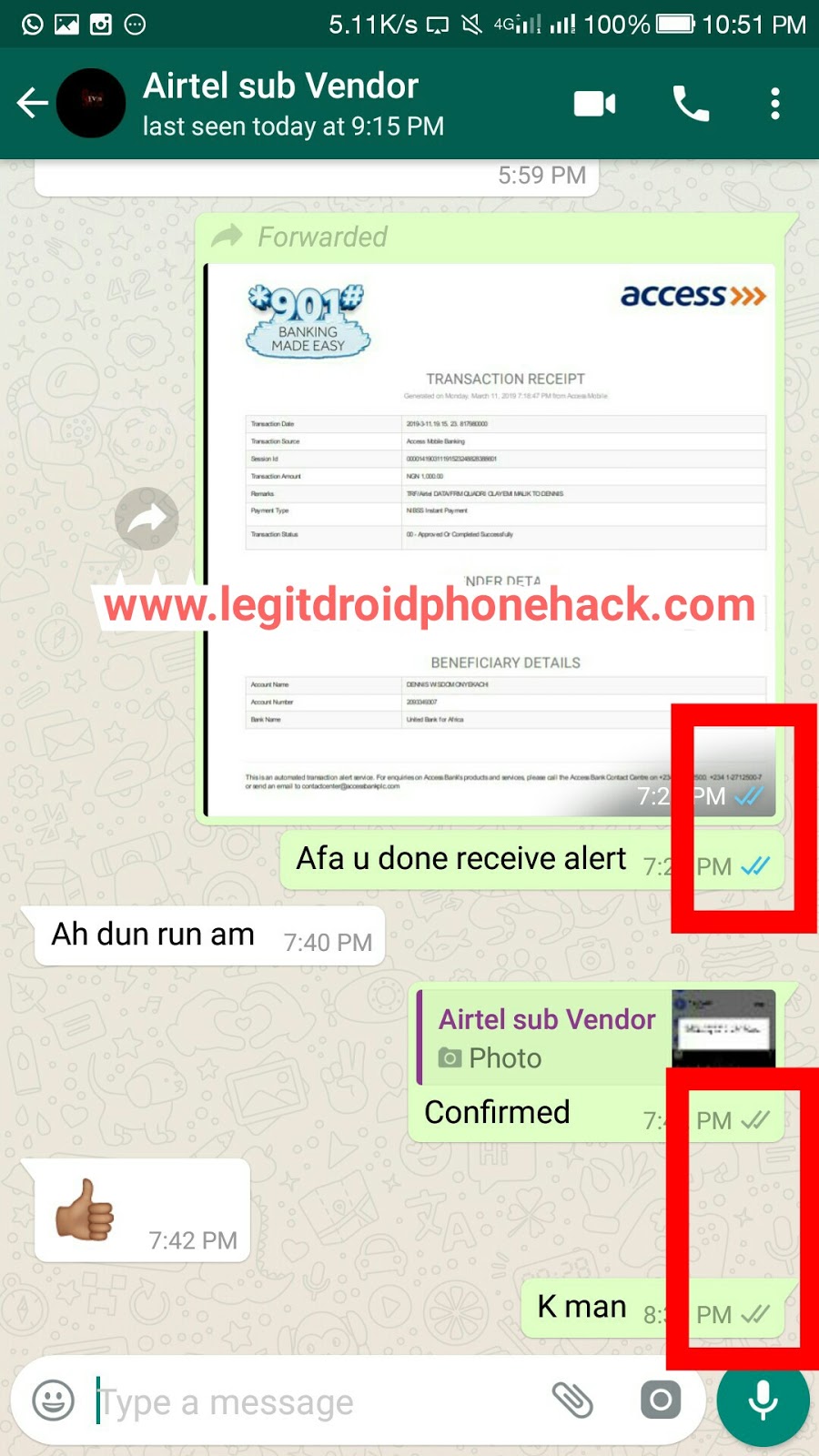
Image of successfully disabling Blue message double tick icon TIPs!
whatsapp status tips
Whatsapp blue tick disable

There are more tips to just the few whatsapp hidden features we just mentioned and for sure since we are to update this article every time we come across a new whatsapp tip.
Now you have successfully disabled blue double tick icon and Viewed status notification, there is yet another interesting whatsapp tips which lets you hide your last seen.
To hide your last seen kindly set last seen to (Nobody) and continue your whatsapp ๐Ÿ˜๐Ÿ˜
Note!

Disabling viewed whatsapp status also disables user from being notified of whomever viewed his/her status. When ever someone views your status after you might have disabled viewed WhatsApp status, you will not be able to see users who viewed your status. Just as they wont also be able to get notified that you viewed theirs.


Disabling blue double tick feature:
Making user not to be able to know when message is been read. This feature is pretty cool, just as you might always want to snub or read messages without dropping a reply back.

You can always make changes anytime.
Hope this hidden whatsapp tips and trick was helpful, feel free to let us know what you think about our posts.

Tags: Whatsappwhatsapp downloadwhatsapp group blue tickwhatsapp updatewhatsapp view messages in group
SendShare383Tweet239Share
Droidvilla Admin

Droidvilla Admin

I am Nnoka Godswill also known as Favtechblogger. Lover of Android/Technology, a passionate tech content creator with over 5 years + of blogging experience, an SEO god, a Marketer, and a graduate of Electronics and Computer Engineering from the University of Port Harcourt . Email the author at favtechblogger@gmail.com.

Related Stories

Download/Save Disabled TikTok Videos to Gallery

How to Download/Save Disabled TikTok Videos to Gallery

by Droidvilla Admin
April 27, 2024
0

- How to Download/Save Disabled TikTok Videos to Gallery - Funny TikTokers to follow TikTok is the go-to social media app for content creators and enthusiasts alike, with...

know your GOtv login details

How to Know your GOTV login details (Surname and Phone Number) if forgotten

by Droidvilla Admin
January 22, 2024
1

- How to know your GOtv login details (Surname and Phone Number) if forgotten Hi there, did you forget your login details associated with GOtv and you're looking...

resubmit Pi KYC in 2024

How to resubmit Pi KYC in 2024 and get approval in minutes

by Droidvilla Admin
January 18, 2024
0

Pi has recently given all pioneers the opportunity to resubmit Pi KYC in 2024 after a very long wait. For all those who waited for this long to...

DSTV Now App Not Showing Live Channels

DSTV Now Error: 1 Fix to DSTV Now App Not Showing Live Channels

by Droidvilla Admin
January 14, 2024
0

@dstvcareFinally, here is a solution to fix the dstv now error app not showing live channels when a subscription is active. Theย dstv now error suddenly do not show/display...

Next Post
Unshare data on glo

How to unshare data on glo: code to unshare data on glo in 2021

Comments 14

  1. TECH FIRE says:
    7 years ago

    Thanks, This is helpful.

    Reply
    • Nnoka Godswill (verified) says:
      6 years ago

      You are welcome

      Reply
  2. Anonymous says:
    7 years ago

    Boss thanks man

    Reply
    • Nnoka Godswill (verified) says:
      6 years ago

      You are welcome ๐Ÿ˜

      Reply
  3. Destiny says:
    7 years ago

    Great one

    Reply
    • Nnoka Godswill (verified) says:
      6 years ago

      Thank you๐Ÿ˜Œ

      Reply
  4. Obomedaire Ese says:
    6 years ago

    Very helpful

    Reply
    • Nnoka Godswill (verified) says:
      6 years ago

      Thank you๐Ÿ˜โ˜‘๏ธ

      Reply
  5. miracle onuoha says:
    6 years ago

    Thanks

    Reply
    • Nnoka Godswill (verified) says:
      6 years ago

      Welcome ๐Ÿ˜Š๐Ÿ˜

      Reply
  6. Ericksson says:
    6 years ago

    I love your theme bro, can you help me with it as part of Beautiful season…

    Reply
    • Nnoka Godswill (verified) says:
      6 years ago

      Its a paid template.. You can mail me @ droidvilla.post@gmail.com.

      Reply
  7. Unknown says:
    6 years ago

    Thanks dear Nnoka

    Reply
    • Nnoka Godswill (verified) says:
      5 years ago

      You are welcome

      Reply

Leave a Reply Cancel reply

Your email address will not be published. Required fields are marked *

  • About
  • Advertise
  • Privacy & Policy
  • Contact Us
  • Disclaimer

© 2025 JNews - Premium WordPress news & magazine theme by Jegtheme.

Welcome Back!

Login to your account below

Forgotten Password?

Retrieve your password

Please enter your username or email address to reset your password.

Log In
No Result
View All Result
  • Apk apps
  • Android Tips/Tricks
  • Phone Reviews
  • How To
  • Phone Reviews

© 2025 JNews - Premium WordPress news & magazine theme by Jegtheme.