AI News
  • Apk apps
  • Android Tips/Tricks
  • Phone Reviews
  • How To
  • Phone Reviews
No Result
View All Result
AI News
  • Apk apps
  • Android Tips/Tricks
  • Phone Reviews
  • How To
  • Phone Reviews
No Result
View All Result
AI News
No Result
View All Result
Zoom Background : Best Way To Alter The Background 2023

Zoom Background : Best Way To Alter The Background 2023

Xavi by Xavi
January 15, 2023
in Zoom
0
932
SHARES
3k
VIEWS
Share on whatsappShare on FacebookShare on TwitterShare on Telegram
Contents hide
I. Using Zoom’s Virtual Backdrop Function is As Follows:
II. How To Access Virtual Zoom Background

Before we  talk about altering zoom background a sizable majority of individuals favor remote employment. Additionally, IT firms that make telecommuting feasible have expanded along with the surge in remote employment.

Who of these businesses has benefited from everything else? Zoom, a platform for video conferences. Since the pandemic in 2020, Zoom has emerged as a leader in the shift to remote work thanks to its hundreds of millions of users.

People continue to utilize Zoom to communicate with colleagues for video meetings even when shops and offices reopen. Since then, Zoom has grown outside of the traditional office environment as well, with many podcasters, videographers, and livestreamers also utilizing the service to produce content.

It’s not an issue if you’re new to Zoom. The app is extremely simple to use and provides a substantial free plan to let you try it out. However, if you do have a query concerning Zoom, it is presumably in relation to its popular virtual backdrop function.

It enables users to stream with friends, family, and colleagues without a green screen by replacing their actual backdrop with a picture or video.

Using Zoom’s Virtual Backdrop Function is As Follows:
Zoom Background
Using Zoom’s Virtual Backdrop Function is As Follows:
  • Step 1:Download the Zoom program for Mac or Windows.
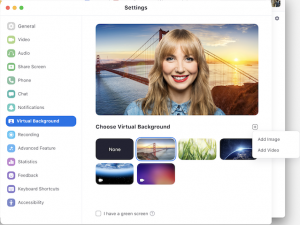
  • Step 2: Launch the app, log in, and then choose Settings from the drop-down menu after clicking your profile image.
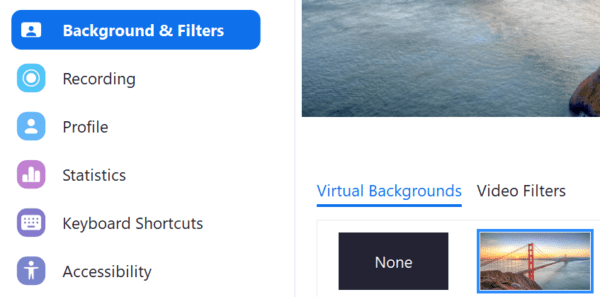
  • Step 3: Go to the tab for the virtual background. (If you cannot view this page, sign in to the Zoom website, choose Meeting Settings, and confirm that the Virtual Background checkbox is selected under the Meeting tab.)
  • Step 4: Users may upload their own images or movies or choose from pre-installed backdrops under the Virtual Background menu
  • Step 5 : Select “I have a green screen” if you have a green screen setup so that the program can set up your backdrop correctly. Zoom advises broadcasting from a place with a solid backdrop color if you don’t have a green screen.

You may modify your backdrop on the iOS app if you’re using Zoom from an iPhone or iPad.

How To Access Virtual Zoom Background

Zoom background
How To Access Virtual Zoom Background
  • Click the “More” option in the bottom right corner.
  • Once you have joined a meeting and are signed into your account, select the More option
  • Select Virtual Background by tapping it
  • You may upload your own images or choose one from the available collection.
  • Check the system requirements to determine whether you can activate the virtual backdrop function if you’re having trouble using Zoom virtual backgrounds on an older computer or mobile device.
  • You may choose the exotic location or vintage film scene that will serve as your backdrop. Zoom Backgrounds is a website created specifically for that purpose if you’re seeking for some free selections to utilize.

Join Our Telegram Channel For More Exciting Updates Via The Link Below

Telegram Channel

Tags: How toZoomZoom Background
SendShare372Tweet233Share
Xavi

Xavi

I am Pepple Xavier also known as Blaze, a Droidvilla content creator, A 400 level student in the University of Port Harcourt, studying Mechatronics Engineering. Found passion in technology ⚙ and decided to keep the world in touch with latest happenings around the world of technology. Visit us for daily tips and tricks, How To's and lots more www.droidvilla.com have to offer

Related Stories

Amazing : Zoom Is Adding New Features To Avoid Embarrassing Situation 2022

Amazing : Zoom Is Adding New Features To Avoid Embarrassing Situation 2022

by Xavi
January 30, 2022
1

Since the pandemic, Zoom has become an essential part of the modern-day workforce. To offer a nice meeting experience for everyone, Zoom is announcing a slate of new features....

Best Way To Change Zoom Background On Mobile App 2022

Best Way To Change Zoom Background On Mobile App 2022

by Xavi
January 17, 2022
2

Millions of people started making use of the Zoom video chat app to work and study from home during the pandemic, and even with vaccines and boosters rolling...

Messaging Apps: Encrypted or not? WhatsApp, iMessage, Discord, Zoom, etc.

2022 Messaging Apps: Encrypted or not? WhatsApp, iMessage, Discord, Zoom, etc.

by Celine Simon
January 2, 2022
0

Messaging Apps: Encrypted or not? WhatsApp, iMessage, Discord, Zoom, etc. Why do you need end-to-end encrypted messaging? Whether or not you have nothing to hide, keeping your privacy...

Best Ways To Change Zoom Profile Picture on Desk­top and Mobile 2021

Best Ways To Change Zoom Profile Picture on Desk­top and Mobile 2021

by Xavi
October 12, 2021
0

When you sign up for Zoom using your Google or Microsoft account, the service takes the zoom profile picture from the connected account. If you want to change...

Next Post
Truecaller v10.56.7 apk Premium Gold

Truecaller v10.56.7 apk Premium Gold Membership Download 2020

Leave a Reply Cancel reply

Your email address will not be published. Required fields are marked *

  • About
  • Advertise
  • Privacy & Policy
  • Contact Us
  • Disclaimer

© 2025 JNews - Premium WordPress news & magazine theme by Jegtheme.

Welcome Back!

Login to your account below

Forgotten Password?

Retrieve your password

Please enter your username or email address to reset your password.

Log In
No Result
View All Result
  • Apk apps
  • Android Tips/Tricks
  • Phone Reviews
  • How To
  • Phone Reviews

© 2025 JNews - Premium WordPress news & magazine theme by Jegtheme.