 |
| Gaming Laptop |
Purchasing a laptop is easy but knowing the exact one for the job is always the problem,and this makes us feel bad after a purchase.
“The following features are important and should be noted when purchasing a gaming laptop”.
- Dedicated Video Memory
- The Processor(CPU)
- Graphics Card
- Random Access Memory(RAM)
- Storage Space(Hard disk Space)
- Dedicated Video Memory
Dedicated video RAM (memory) from the name is a unique(special) type of RAM that works with your computer’s graphics processing unit(GPU).
The GPU is a chip on your computer’s Video card that is responsible for displaying images on your screen.
Your dedicated video RAM houses information that the GPU needs, including game textures and lighting effects. This allows the GPU to quickly access the information and output video to your monitor(screen).
Using video RAM for this task is much faster than using your system RAM, because dedicated video RAM is right next to the GPU in the graphics card. VRAM is built for this high-intensity purpose and hence “dedicated.”
It is one of the most important feature of a gaming laptop
How to Check my laptop’s dedicated Graphics memory
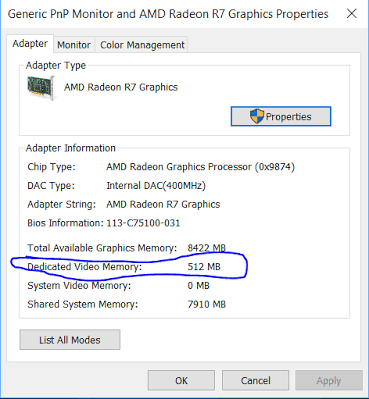 |
| dedicated graphics memory |
- Right click on your destop and click on screen resolution.
- Select Advance settings on the Right sidebar.
- In a new window, you’ll see your current video RAM listed next to Dedicated Video Memory.
” dedicated video memory of 1gb(1004mb) and above is a prerequisite for a gaming laptop.”
- The Processor
The processor is also as important as the GPU, because it is for overall system performance, in that it processes everything needed by your system.High end gaming computers will often feature i5 or i7 processors with up to 8 cores, however for a cheap gaming PC a processor with 4 cores is all you will need.
How to check my processor properties
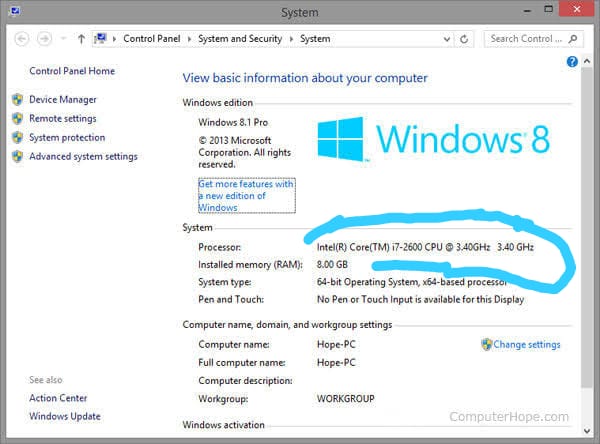 |
| processor properties |
- Go to your file manager by pressing WINDOWS E.
- Move to any empty space and right click.
- Click on properties.
- Your processor value would be displayed in Gigahertz(Ghz).
” A processor of 4 cores and above is a prerequisite for gaming laptops.”
- Graphics Card
A graphics card is often like a type of display adapter or video card installed within most computing devices to display graphical data with high clarity, color, definition and overall appearance.
A graphics card can also be called a graphics adapter, graphics controller, graphics accelerator card or graphics board. Graphics cards includes the Intel, AMD and the Nvidia Graphics card,which have different grades depending on performance.
How to check my Graphics Card
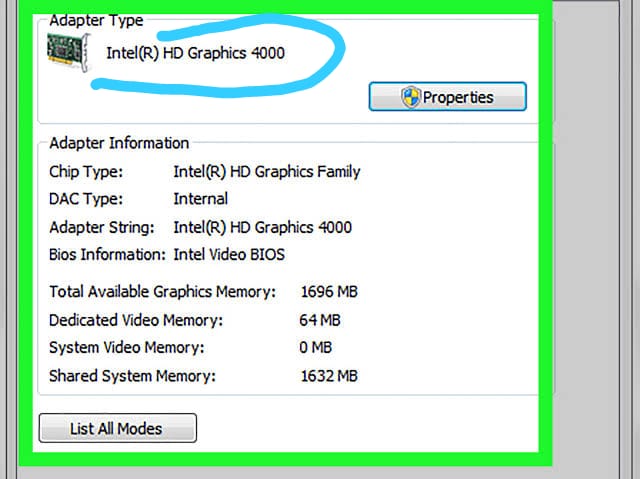 |
| graphics adapter type |
- Right click on your destop and click on screen resolution.
- Select Advance settings on the Right sidebar.
- In a new window, you’ll see your current Graphics card listed at the top of the box(Adapter type).
“Nvidia Graphics card is a prerequisite for high end gaming laptop.”
- Random Access Memory(RAM)
This feature is important for gaming laptops. RAM tells you about how many programs you can run on your system at the same time without slowing it down.
High end laptops are coming with 8GB RAM, but these systems are a bit expensive.However You can buy a laptop with 4GB RAM that will stil run graphics accordingly. However, the more RAM you have installed in your system the more ease to play games. simply say RAM is necessary for running video graphics whether they are 3D or general games.
How to check my laptop’s RAM
 |
| RAM Check |
- Go to your file manager by pressing WIN DOWS E.
- Move to any empty space and right click.
- Click on properties.
- Your RAM value would be displayed(Installed memory) in Gigabyte(GB).
” Ram size of 4gb and above is a prerequisite for a gaming laptop.”
- Storage Space(Hard disk Space)
Another important feature in a gaming laptop is the hard disk space because,
for playing games, you always need to have space in your hard drive, so it must be of 1 TB at least for massive games which require a good amount of space.
How to check my hard disk Space
 |
| hard disk space |
- go to your file manager by pressing Windows E
- your hard drive space would be displayed in Gigabytes(Gb)
“hard disk space of 1terabyt(TB) is a prerequisite for gaming laptops.”
With the above features put in place, You can be able to get a good gaming system of your choice to enable you play high end games.
Don’t forget to subscribe to our newsletter for more exclusive update.