
You can now check your mtn call history duration and amount spent up to 7 days using MyMtnApp installed directly on your Android or iOS.
 |
| Mtn Call, Vas, sms, data and recharge history |
If you are wondering why fast your airtime is been exhausted, with MyMtnApp, you can swiftly get rundown of your call history,
duration and amounts spent in the last 7 days.
In getting to know your mtn call history for the past 7 days, you can as well get to check Data history, sms history, VAS and recharge history.
This is just a good way of knowing how much you spend in data, airtime, sms and call, and letting you know how to manage your data, sms, call and vas usage, to avoid over spending.
How To Check MTN Call History Duration, SMS History, Data, Recharge History and VAS History On MyMtnApp
 |
| How To Check MTN Call History Duration, SMS History, Data, Recharge History and VAS History On MyMtnApp |
To check mtn call history duration and amount spent up to 7 days simply
- Download MyMtnApp from Google PlayStore
- Open MyMtnApp and login using the MTN number you want to get account history of
- Once logged in, tap on the three vertical lines at the top left side of the app screen.
- Now tap on the Account History tab
- Finally you should see options to check Call, Vas, sms, data and recharge tap on the CALL option and you should now see 7 days call history duration and amount spent.
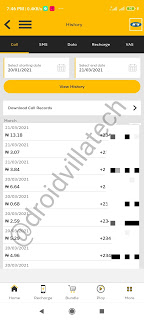
MTN Call, Vas, sms, data and recharge history

To further check for Vas, sms, data and recharge simply use the respective options provided.
Note: Sms, recharge and calls maximum history duration is 7 days, while mtn data history check limit is 3 days.
Awesome write up.. Visit NairaTechs Blog for all network free browsing cheats, apps and apps solutions, blogging tips and more👇
Naira Techs