
AI News
  • Apk apps
  • Android Tips/Tricks
  • Phone Reviews
  • How To
  • Phone Reviews
No Result
View All Result
AI News
  • Apk apps
  • Android Tips/Tricks
  • Phone Reviews
  • How To
  • Phone Reviews
No Result
View All Result
AI News
No Result
View All Result
How To Prevent Android Apps Auto-Update Using Mobile Data

How To Prevent Android Apps Auto-Update Using Mobile Data

An Easy Guide On How To Prevent Android Apps Auto-Update Using Mobile Data 2021

Celine Simon by Celine Simon
December 19, 2021
in Android Tips/Tricks, Android, Google, How To, Tech Info
0
930
SHARES
3k
VIEWS
Share on whatsappShare on FacebookShare on TwitterShare on Telegram
  • An Easy Guide On How To Prevent Android Apps Auto-Update Using Mobile Data

Android is programmed to keep all of your apps updated with little effort. Sadly, the update process can be massive and can exhaust all your mobile data.

Most Android apps are at least 70MB in size and can exhaust up to several gigabytes for games. In a short while, these auto-updating apps can suck out all your mobile data limits.

By default, a lot of Android phones are programmed to update the latest app updates automatically when connected to the mobile data or Wi-Fi network.

Surprisingly , you can set your phone to download updates only through a Wi-Fi network. Here’s a simple guide on how to regulate how your phone uses mobile data.

HOW TO DEACTIVATE THE AUTO-UPDATE FUNCTION OF THE GOOGLE PLAY STORE
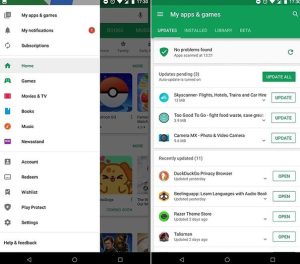
How To Prevent Android Apps Auto-Update Using Mobile Data

Android operates app updates and system updates differently. System updates include new versions of Android, updated security definitions to keep your phone free from viruses, and other corrupt files. These are automatically set, by default, to only download when connected to Wi-Fi, and they should not be turned off.

Moreover, apps, including the preinstalled ones, are updated using the Googl play store. Automatic Data app updates be deactivated by following these simple steps:

  • Click on the Google Play Store app on your phone.
  • Click on your Profile Picture that’s located on the upper right-hand side of the screen.
  • Promptly click on the Settings option.
  • Choose Preffered network.
  • Click on Auto-update apps to open the update settings menu.
  • Click on Don’t auto-update apps from the list and then press Done.

That’s all how you can go about disabling the auto-update feature for apps. That said, you should note that you should never completely disable this feature. App updates often contain security caches that keep your data safe. Some apps may even stop working properly if you do not update them for a long time.

These issues can be avoided by selecting Over Wi-Fi only in the Auto-update apps menu. This way you can prevent app updates from using your Mobile Data.

These steps only applies to apps that have already been downloaded from Google play store.

You can visit our telegram channel for more information http://t.me/droidvilla

Tags: Auto UpdateGoogle PlayStoreHow to prevent apps from auto updating
SendShare372Tweet233Share
Celine Simon

Celine Simon

Related Stories

Download/Save Disabled TikTok Videos to Gallery

How to Download/Save Disabled TikTok Videos to Gallery

by Droidvilla Admin
April 27, 2024
0

- How to Download/Save Disabled TikTok Videos to Gallery - Funny TikTokers to follow TikTok is the go-to social media app for content creators and enthusiasts alike, with...

know your GOtv login details

How to Know your GOTV login details (Surname and Phone Number) if forgotten

by Droidvilla Admin
January 22, 2024
1

- How to know your GOtv login details (Surname and Phone Number) if forgotten Hi there, did you forget your login details associated with GOtv and you're looking...

resubmit Pi KYC in 2024

How to resubmit Pi KYC in 2024 and get approval in minutes

by Droidvilla Admin
January 18, 2024
0

Pi has recently given all pioneers the opportunity to resubmit Pi KYC in 2024 after a very long wait. For all those who waited for this long to...

DSTV Now App Not Showing Live Channels

DSTV Now Error: 1 Fix to DSTV Now App Not Showing Live Channels

by Droidvilla Admin
January 14, 2024
0

@dstvcareFinally, here is a solution to fix the dstv now error app not showing live channels when a subscription is active. The dstv now error suddenly do not show/display...

Next Post
Few WhatsApp Settings That May Need Urgent Attention

Few WhatsApp Settings That May Need Urgent Attention 2021

Leave a Reply Cancel reply

Your email address will not be published. Required fields are marked *

  • About
  • Advertise
  • Privacy & Policy
  • Contact Us
  • Disclaimer

© 2025 JNews - Premium WordPress news & magazine theme by Jegtheme.

Welcome Back!

Login to your account below

Forgotten Password?

Retrieve your password

Please enter your username or email address to reset your password.

Log In
No Result
View All Result
  • Apk apps
  • Android Tips/Tricks
  • Phone Reviews
  • How To
  • Phone Reviews

© 2025 JNews - Premium WordPress news & magazine theme by Jegtheme.