AI News
  • Apk apps
  • Android Tips/Tricks
  • Phone Reviews
  • How To
  • Phone Reviews
No Result
View All Result
AI News
  • Apk apps
  • Android Tips/Tricks
  • Phone Reviews
  • How To
  • Phone Reviews
No Result
View All Result
AI News
No Result
View All Result
Best Way To Remove Screenshot Delay on Android Without Root access

Best Way To Remove Screenshot Delay on Android Without Root access

Droidvilla Admin by Droidvilla Admin
June 2, 2022
in How To, Android Tips/Tricks, Apk apps
4
963
SHARES
3.1k
VIEWS
Share on whatsappShare on FacebookShare on TwitterShare on Telegram

Screenshot delay is something default to almost if not all Android devices and this often makes taking screenshots boring to many.

    Screenshot delay is one reason most Android users prefer to use third-party applications that offers faster screenshot initiation.

    Taking a fast and quick screenshot is very necessary and the reason Droidvilla Tech Solution had to look forward to getting a secured method on how to remove delay while trying to take a quick screenshot of your Android screen display.
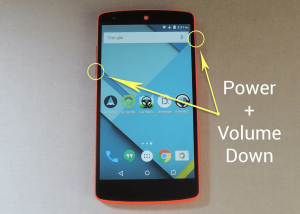
    Screenshot Delay
    Best Way To Remove Screenshot Delay on Your Android Without Rooting

    So if you are one Android user who experiences screenshot delay and wishes to enjoy taking a faster screenshot of your Android screens, then follow our easy step by step guide below.

    How To Remove Screenshot Delay In Android [No Root]

    To remove screenshot delay, first, you have to enable the Android developer option on your android device. Let’s get a quick snippet of how to become an android developer

    • Step 1: Go to Android settings
    • Step 2: Click on About phone
    • Step 3: Keep tapping on Build Number ( you should get a notification telling you that you are now a developer).
    • Step 4: Go back and you should be able to see Developer Option before About Phone.
    Now you are a developer let’s get down to how you can now remove screenshot delay.
    remove screenshot delay on android without rooting
    Best Way To remove screenshot delay on android without rooting
    Here is the best, fastest, easiest, and safest method to remove Screenshot delay on your android without root access you will ever find online.
    • Step 1: Click on Developer Option and scroll down to where you see window animation scale, Transition animation scale, and Animator duration scale.
    • Step 2: Simply turn them off and close settings.
    • Step 3 : Now make a screenshot and see how fast it has become.
    Don’t forget to share this post and follow us on the below social platforms.

    https://t.me/droidvilla

    Tags: developerdeveloper optionsdevelopersRemove screenshot delayscreenshot delay no rootscreenshot delay removal
    SendShare385Tweet241Share
    Droidvilla Admin

    Droidvilla Admin

    I am Nnoka Godswill also known as Favtechblogger. Lover of Android/Technology, a passionate tech content creator with over 5 years + of blogging experience, an SEO god, a Marketer, and a graduate of Electronics and Computer Engineering from the University of Port Harcourt . Email the author at favtechblogger@gmail.com.

    Related Stories

    Download/Save Disabled TikTok Videos to Gallery

    How to Download/Save Disabled TikTok Videos to Gallery

    by Droidvilla Admin
    April 27, 2024
    0

    - How to Download/Save Disabled TikTok Videos to Gallery - Funny TikTokers to follow TikTok is the go-to social media app for content creators and enthusiasts alike, with...

    know your GOtv login details

    How to Know your GOTV login details (Surname and Phone Number) if forgotten

    by Droidvilla Admin
    January 22, 2024
    1

    - How to know your GOtv login details (Surname and Phone Number) if forgotten Hi there, did you forget your login details associated with GOtv and you're looking...

    resubmit Pi KYC in 2024

    How to resubmit Pi KYC in 2024 and get approval in minutes

    by Droidvilla Admin
    January 18, 2024
    0

    Pi has recently given all pioneers the opportunity to resubmit Pi KYC in 2024 after a very long wait. For all those who waited for this long to...

    DSTV Now App Not Showing Live Channels

    DSTV Now Error: 1 Fix to DSTV Now App Not Showing Live Channels

    by Droidvilla Admin
    January 14, 2024
    0

    @dstvcareFinally, here is a solution to fix the dstv now error app not showing live channels when a subscription is active. The dstv now error suddenly do not show/display...

    Next Post
    convert crypto to NGN roqqu

    Withdraw on Roqqu: Convert crypto to NGN and withdraw directly to your local bank account in 2 easy steps

    Comments 4

    1. Hollyp says:
      5 years ago

      This post really helps

      Reply
    2. Unknown says:
      5 years ago

      Goodwork

      Reply
    3. 카지노사이트 says:
      5 years ago

      Good post. I learn something totally new and challenging
      on websites I stumbleupon every day. It will always be useful to read articles from other
      writers and practice a little something from other sites.

      Reply
      • Droidvilla Admin says:
        5 years ago

        Thank you very much

        Reply

    Leave a Reply Cancel reply

    Your email address will not be published. Required fields are marked *

    • About
    • Advertise
    • Privacy & Policy
    • Contact Us
    • Disclaimer

    © 2026 JNews - Premium WordPress news & magazine theme by Jegtheme.

    Welcome Back!

    Login to your account below

    Forgotten Password?

    Retrieve your password

    Please enter your username or email address to reset your password.

    Log In
    No Result
    View All Result
    • Apk apps
    • Android Tips/Tricks
    • Phone Reviews
    • How To
    • Phone Reviews

    © 2026 JNews - Premium WordPress news & magazine theme by Jegtheme.