AI News
  • Apk apps
  • Android Tips/Tricks
  • Phone Reviews
  • How To
  • Phone Reviews
No Result
View All Result
AI News
  • Apk apps
  • Android Tips/Tricks
  • Phone Reviews
  • How To
  • Phone Reviews
No Result
View All Result
AI News
No Result
View All Result
Archive WhatsApp Chats

Archive WhatsApp Chats

How To Archive WhatsApp Chats and Keep Them Archived Forever

Droidvilla Admin by Droidvilla Admin
August 13, 2021
in WhatsApp
0
968
SHARES
3.1k
VIEWS
Share on whatsappShare on FacebookShare on TwitterShare on Telegram

– You can now Archive WhatsApp Chats and Keep Them Archived Forever

Contents hide
I. WhatsApp Archived Chats Archived Forever
II. How To Activate Archive WhatsApp Chats and Keep Chats Archived Forever
III. How to Disable Keep Chats Achieved forever

In recent WhatsApp update, users can now Archive whatsapp chats and keep them Archived forever to avoid interruption.


Previously, a WhatsApp user can only archive a chat, but when a new message comes on the Archived chats appears back to the top of the conversation.

Based on users demand and desire, whatsapp has finally made a way where a user can absolutely Archive a chat and get it Archived forever.

This newly enhanced whatsapp Archived feature is more like an archive upgrade, that lets users HIDE A CHAT CONVERSATION FOREVER, from intruders.


WhatsApp Archived Chats Archived Forever

  • No more getting new notifications from archived chats.
  • Archived chats remains in “Archived Folder” forever.

How To Activate Archive WhatsApp Chats and Keep Chats Archived Forever

Follow below steps accordingly to know Activate Archive WhatsApp Chats and Keep chats Archived Forever.
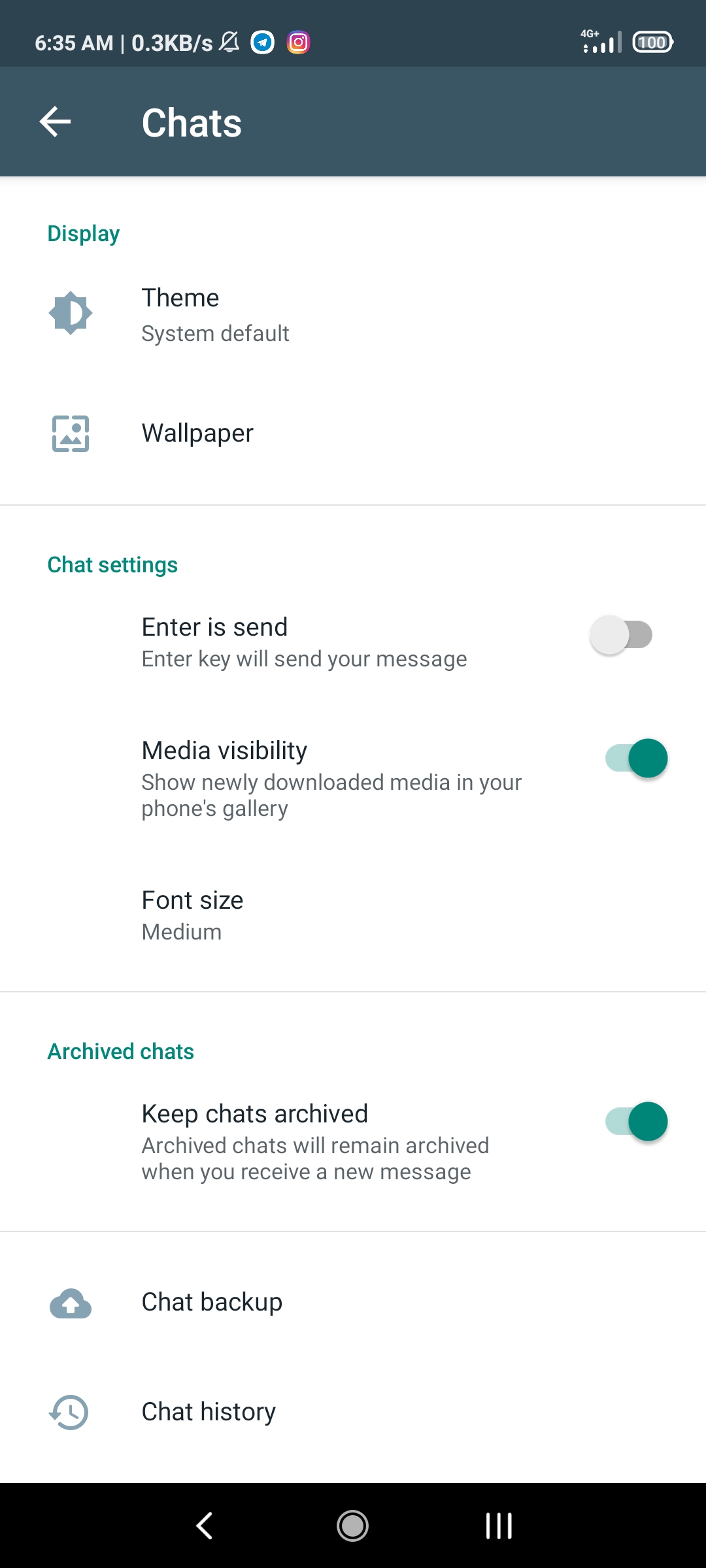
Archive WhatsApp Chats
Keep whatsapp chats Archived
  • Firstly, update your WhatsApp to the latest version via Google PlayStore Or App Store
  • Open whatsapp
  • Tap on three dotted icons top left side of WhatsApp App
  • Tap on settings
  • Locate and tap on Chats
  • Now you see “Archived Chats“
  • Tap on it to Enable, or if already enabled by default, you can close the settings area to confirm.

Finally you have successfully archived all whatsapp archive chats.


How to Disable Keep Chats Achieved forever

Disabling this feature simply mean that, when your chats are been Archived, any new message from the archived contacts chat will get a notification prompt and will get back to the top of the chats.

Who will definitely want this option?


  • Open Whatsapp 
  • Tap on three dotted icons top left side of WhatsApp App
  • Tap on settings
  • Locate and tap on Chats
  • Now you see “Archived Chats“
  • Tap on it to Disable, or if already Disabled, you can close the settings area to confirm.

That is all about How To Archive WhatsApp Chats and Keep Them Archived Forever…

If you have any question for us, the chat section is available and open…


Subscribe to our Telegram Channel Today – Subscribe Here

Tags: app send on whatsappArchive WhatsApp ChatsArchived chatsbackup whatsapp chatshide official WhatsApp chats foreverhide WhatsApp chats
SendShare387Tweet242Share
Droidvilla Admin

Droidvilla Admin

I am Nnoka Godswill also known as Favtechblogger. Lover of Android/Technology, a passionate tech content creator with over 5 years + of blogging experience, an SEO god, a Marketer, and a graduate of Electronics and Computer Engineering from the University of Port Harcourt . Email the author at favtechblogger@gmail.com.

Related Stories

WhatsApp 60sec Video Status Length Upload

WhatsApp 60sec Video Status Length Upload

by Droidvilla Admin
April 26, 2024
0

WhatsApp 60sec Video Status Length Upload : A Game-Changer for Users! WhatsApp, known for its user-centric approach and frequent updates, has done it again! With the latest update,...

WhatsApp media upload quality to best quality

How to change official WhatsApp media upload quality to best quality

by Droidvilla Admin
April 7, 2023
0

Newly released update lets a user to change WhatsApp media upload quality to best quality and Battery saver quality. If you have been complaining of WhatsApp reducing your...

WhatsApp iOS Picture in Picture

WhatsApp iOS Picture in Picture (Pip) support for v23.3.77

by Droidvilla Admin
March 4, 2023
0

The newly added WhatsApp iOS Picture in Picture (Pip) support for v23.3.77 is out and available for everyone. PIP, or Picture-in-Picture, is a function that enables users to...

WhatsApp message disappearing feature

WhatsApp message disappearing feature casted in latest update

by Droidvilla Admin
March 4, 2023
0

The WhatsApp message disappearing feature literally just got cast in the recent update. Millions of users are out there lamenting about the just updated WhatsApp message disappearing feature...

Next Post
Telegram 8.0.1

7 Best Ways To Fix Telegram Photos Not Appearing In Phones Gallery

Leave a Reply Cancel reply

Your email address will not be published. Required fields are marked *

  • About
  • Advertise
  • Privacy & Policy
  • Contact Us
  • Disclaimer

© 2026 JNews - Premium WordPress news & magazine theme by Jegtheme.

Welcome Back!

Login to your account below

Forgotten Password?

Retrieve your password

Please enter your username or email address to reset your password.

Log In
No Result
View All Result
  • Apk apps
  • Android Tips/Tricks
  • Phone Reviews
  • How To
  • Phone Reviews

© 2026 JNews - Premium WordPress news & magazine theme by Jegtheme.